A tutoring flyer gets read in the few seconds a parent spends at a library board: long enough to spot a subject, a grade and a price. Tutors pin them up in libraries, community centers and coffee shops, and send the image to school group chats. This page has a subject grid you can copy, wording for elementary help, test prep, online sessions and tuition classes, the sizes to print, and a walkthrough for building it in Flyer Maker.
What to put on a tutoring flyer
Lead with the three facts a parent needs before texting you: the subject, the grade and the price. The rest goes underneath, in this order.
- Subjects, named exactly. "Algebra 1, Geometry, Chemistry" tells a parent more than "math and science".
- Grade levels. "Grades 2 to 6" or "high school and college", right under the headline.
- Format and place. "Online, or in person at the Larkcombe library." Say whether you travel to homes.
- Rate. "$40 per hour" or "4 sessions for $150". A price on the flyer saves a round of texts.
- Qualifications you can prove. A degree and major, a teaching license and its state, or "3 years tutoring".
- When you're free. "Weekdays 3:30 to 7 PM, Saturday mornings."
- A single booking route. A text number or a short booking link. Give one option, not three.
- Your name. First name and last initial is enough on a public board.
Optional, in smaller type:
- A free first meeting. "Free 15-minute call to talk about goals", if you offer one.
- Tear-off tabs or a QR code, so a parent leaves with your number.
- A background check. Mention it only if you have a current one you can show.
- Languages. "Sessions in English or Spanish." The bilingual flyer guide has layouts that fit two languages.
A subject grid for your tutoring flyer
Once you teach more than three subjects, a small grid reads faster than a sentence. Stop at five rows so the text can stay large.
| Subject | Grades | Format |
|---|---|---|
| Reading and phonics | K to 3 | In person |
| Math facts and fractions | 2 to 5 | In person or online |
| Pre-algebra and Algebra 1 | 6 to 9 | Online |
| Essay writing | 6 to 12 | Online |
| SAT and ACT math | 10 to 12 | Small group |
Type the rows into your flyer description in the same order, one subject per line, and pick Packed as the layout under More options, which fits more text. Then check every row of the result against your list.
Tutoring flyer ideas and wording
The tutoring flyer examples below give each kind of tutoring two headline options, one supporting line and the exact words for the call to action. Every tutor, rate and phone number here is a placeholder to replace with your own.
Elementary reading and math
A tutoring flyer for elementary students is read by the parent, not the child, so name the skill the parent is worried about.
- Headlines: "Reading Help for Grades K to 3" or "Math Facts Tutoring, Grades 2 to 5"
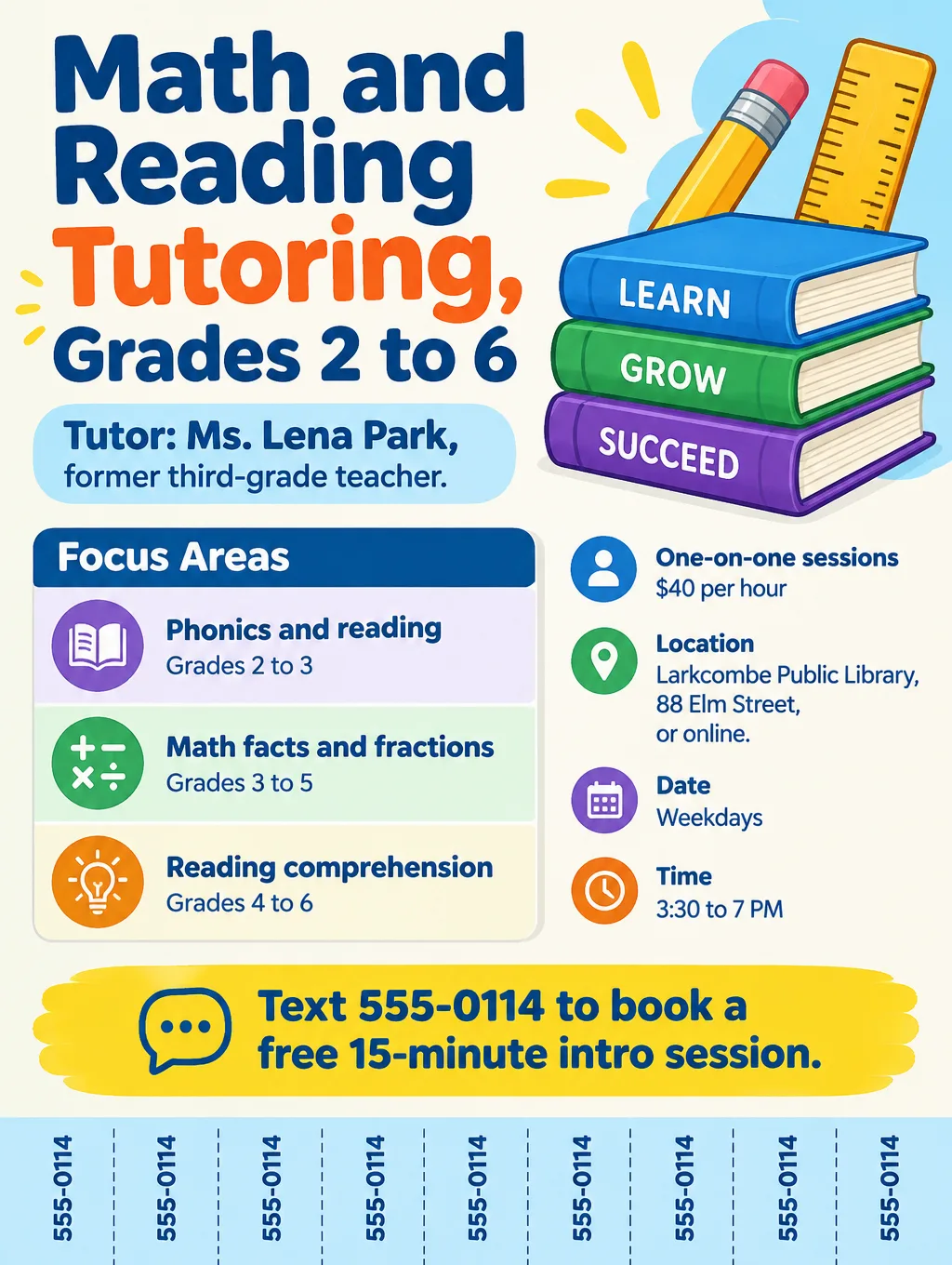
- Supporting line: "One-on-one sessions with a former third-grade teacher. Phonics, fluency and comprehension."
- Call to action: "Text Ms. Park at 555-0114 to book a free 15-minute intro session."
If you want your first stack out in time for the start of the school year, the back-to-school flyers page has wording for open houses and supply drives where you could ask to leave a few copies.
Middle and high school subjects
A flyer for tutoring services that covers several subjects reads best when each subject gets its own line, with the grades next to it.
- Headlines: "Algebra 1 and Geometry Tutoring" or "Chemistry Help Before Finals"
- Supporting line: "Homework help and test review for grades 7 to 12. $40 per hour, online or at the library."
- Call to action: "Pick a time at example.com/tutor."
SAT and ACT prep
A test-prep flyer is built around real test dates, so check them before every print run. As of September 2026, these are the next national dates the College Board and ACT list, with room for a prep course before each. The SAT also runs on May 1 and June 5, 2027, and the ACT on October 17. Science is an add-on test on the ACT, so say whether your ACT prep covers it.
| Test | Date | Regular registration deadline |
|---|---|---|
| SAT | Saturday, November 7 | October 23 |
| SAT | Saturday, December 5 | November 20 |
| ACT | Saturday, December 12 | November 6 |
| SAT | Saturday, March 6 | February 19 |
Don't schedule a prep session on a test morning. A Saturday class that meets on November 7 loses every student sitting that SAT.
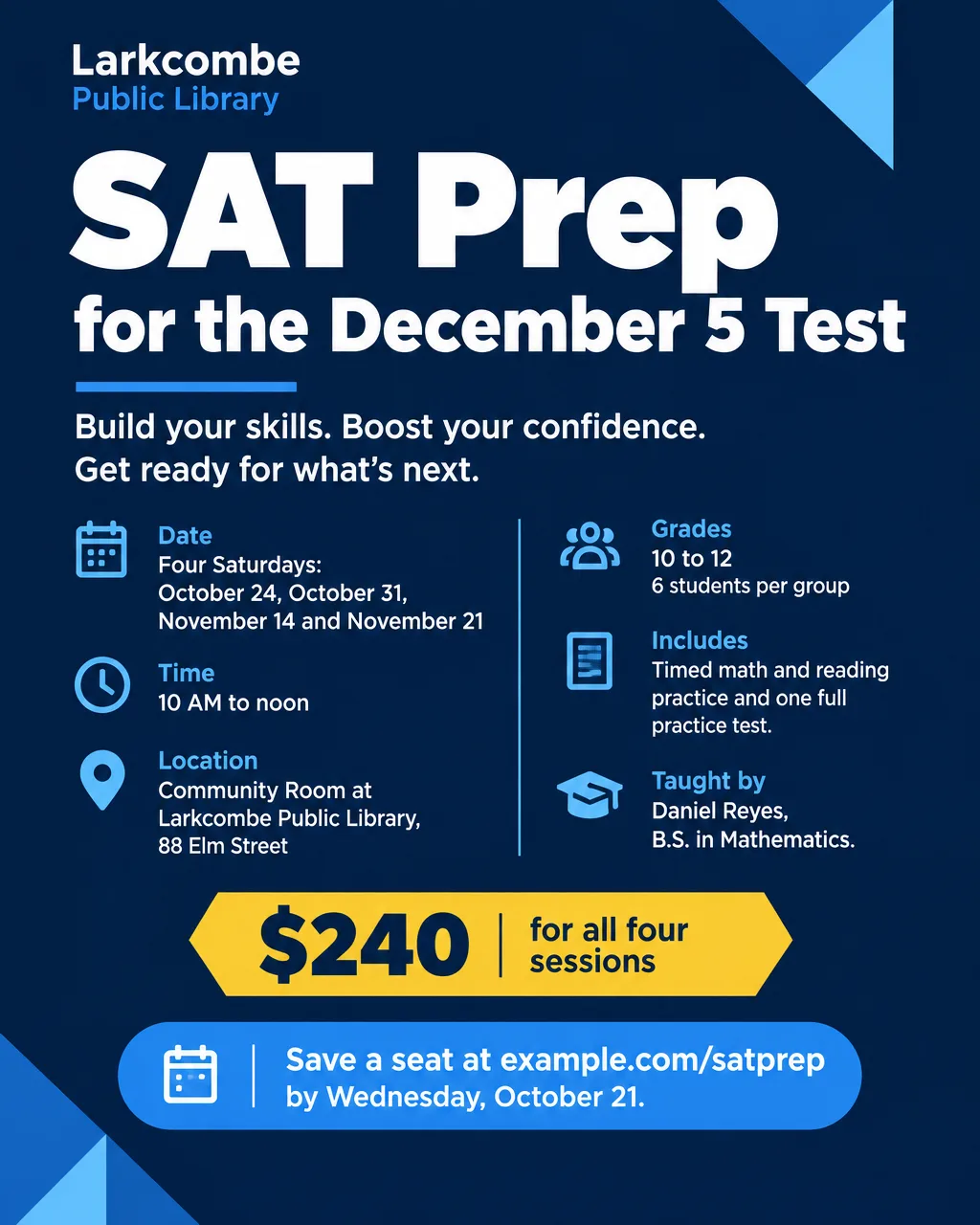
- Headlines: "SAT Prep for the December 5 Test" or "ACT Math Boot Camp"
- Supporting line: "4 Saturday sessions, 6 students per group, timed practice and one full practice test."
- Call to action: "Save a seat at example.com/satprep. Register for the December 5 SAT itself by November 20."
College students tutoring on campus
A college tutor's strongest line is the exact course they passed and the grade they got. Post near the department office or in the library, where the students taking that course study.
- Headlines: "Calc 1 Tutoring from a Math Major" or "Intro Chem Help, Weeknights"
- Supporting line: "Junior in chemistry, A in General Chemistry 1 and 2. $25 per hour in the library study rooms."
- Call to action: "Text Jordan at 555-0121."
High school and college students who also babysit can reuse the same layout for babysitting flyers, which need their own safety wording about how parents reach you.
Online tutoring
An online tutoring flyer goes out through group chats and neighborhood apps, so swap the street address for your time zone and a booking link that works on a phone.
- Headlines: "Live Online Reading Help" or "Online Math Tutoring, Grades 6 to 12"
- Supporting line: "Video sessions with a shared whiteboard. Evenings until 9 PM Eastern."
- Call to action: "Book a first session at example.com/book."
Tuition classes and small groups
In British English, "tuition" mainly means teaching given to one person or a small group, while in American English it usually means the fee. A flyer for tuition classes in the first sense sells a group timetable more than one tutor's hours.
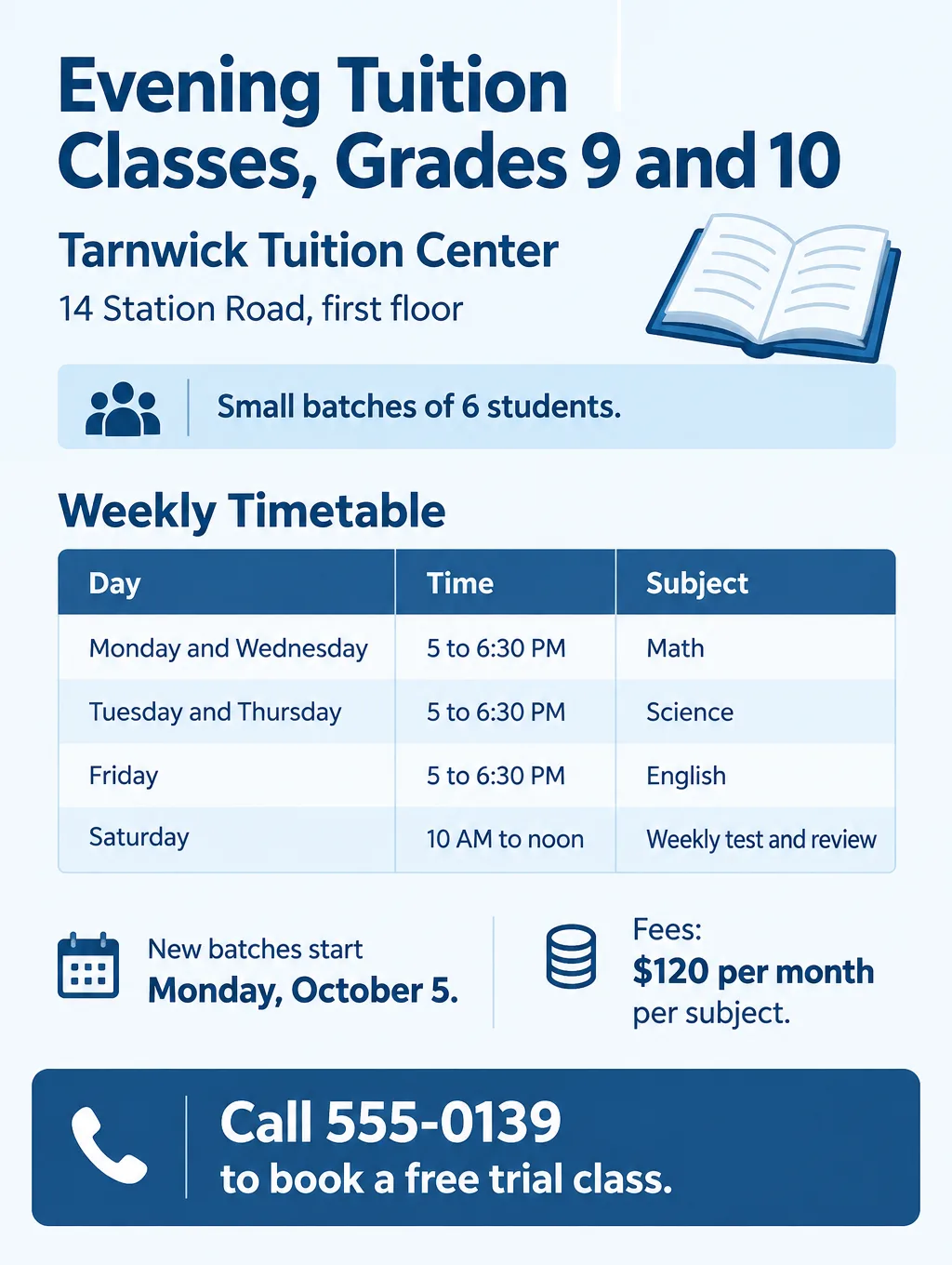
- Headlines: "Evening Tuition Classes for Grades 9 and 10" or "Math and Science Batches Now Open"
- Supporting line: "Batches of 6 students, Monday to Saturday, 5 to 8 PM."
- Call to action: "Call 555-0139 for the fee schedule and a free trial class."
A one-time study-skills session or an exam-week review class works more like a single class than ongoing tutoring. The workshop flyer wording covers seats, materials and registration deadlines for that kind of event.
Design tips for tutoring flyers
Put the grade range next to the headline. A parent at a library board decides from the headline and one more line. "Grades 2 to 6" in large type does more work than a clip-art apple.
Add tear-off tabs for paper boards. Ask for "tear-off tabs across the bottom, each with my phone number" in your description, then cut between the tabs before you pin the flyer up.
Show an object, not a child. A pencil, a stack of books or a number line reads as tutoring at a glance. Don't use photos of students you've taught unless their parents agreed in writing.
Match the look to the age group. A playful style with illustrations suits reading and elementary math. A minimal or corporate style with light colors suits SAT prep and college subjects, where parents compare tutors on credentials.
Write the time zone on online flyers. "6 to 9 PM Eastern" keeps a family two time zones away from booking the wrong hour.
Give the rate a fixed home. Put it just under the subjects on every version, so a parent looking at three tutoring flyers on one board can compare prices quickly.
Tutoring flyer sizes and printing
Most tutors need one printed size for boards, one for handouts and one image for phones.
| Tutoring flyer use | Paper size | Pixels for 300 DPI | Flyer Maker setting |
|---|---|---|---|
| Library board with tear-off tabs | Letter, 8.5 x 11 in | 2550 x 3300 | Tall, 4K |
| Front desk or PTA table handout | Half letter, 5.5 x 8.5 in | 1650 x 2550 | Tall, 2K |
| Parents' group chat or neighborhood app | 4:5 image | Screen only | Portrait, 1K |
4OVER4's print resolution guide sets 300 DPI for flyers and other pieces people hold and read up close. Tall is a 3:4 shape, so it matches neither paper exactly. At 4K it is 2480 x 3312 pixels, which spans the full 11-inch height of letter paper at about 300 pixels per inch and leaves an eighth of an inch at each side. On half letter at 2K, the design fills the width at about 280 pixels per inch with a band of white just over half an inch deep above and below it. For printing, choose 2K or 4K. See every common flyer size with its pixel count for other paper.
Common tutoring flyer mistakes
- Promising results you can't show. Only print results you can back up with your own records, and show typical results, not your best one. "Raise your score 200 points" needs records behind it. "Timed practice and a full practice test" doesn't.
- Writing "certified" without a license. Name the credential you hold: "B.A. in Mathematics" or "Licensed teacher, grades 1 to 6".
- Listing every subject from kindergarten to calculus. A long list reads as nobody's specialty. Pick the four or five you teach best, or make two flyers.
- Printing your home address on a public board. List the library or "online" and share your address after a parent books.
- Keeping last season's test dates. Check the SAT and ACT pages each time you reprint.
More tutoring flyer prompts
Two more versions, for a college tutor and a small after-school group. Each prompt carries the full details and the call to action, so paste it as is and change the facts.
Online tutoring flyer. Headline: "Intro Chemistry Tutoring from a Chem Major". Jordan Ellis, junior, chemistry major, A in General Chemistry 1 and 2. One-on-one video sessions for college first-years, Sunday to Thursday, 7 to 10 PM Eastern. $25 per hour, first 30 minutes free. Call to action: "Text Jordan at 555-0121 to book." Clean, modern design with a simple beaker illustration and plenty of white space.Homework club flyer. Headline: "After-School Homework Club, Grades 3 to 5". Small groups of 8 with two tutors, Tuesdays and Thursdays, 3:30 to 5 PM, starting Tuesday, October 13, at Fallowmere Community Center, 402 Maple Street. $15 per session, snack included. Call to action: "Register with Ms. Ortiz in the lobby office or call 555-0128." Playful illustration of a backpack, pencils and a notebook.How to make a tutoring flyer in Flyer Maker
- In Flyer Maker, type the details into "Describe your flyer". List the subjects, grades, format, rate, your credential, your hours and the exact call to action, like "Text 555-0114 to book a free 15-minute call". Then describe the look.
- Choose a Size. Tall suits library boards and handouts; Portrait suits group chats.
- Open "More options" and set Flyer type to Education. The Packed layout fits a subject grid or a class timetable.
- Type your number or booking link in "Contact info". Flyer Maker uses only the contact details you type.
- Turn on "Leave a blank square for your QR code" when you want to link a booking page, then add your real code to that space afterward. Here's how to make and test a QR code for a flyer.
- Tap "Create flyer". Your tutoring flyer appears in about 30 seconds.
- Compare every subject name, grade range, rate and phone number with what you typed, and watch for a tagline you never wrote. Ask for a correction in "Want to change something?" (currently 60 credits, 70 at 2K, 90 at 4K), or edit the description and make a new one.