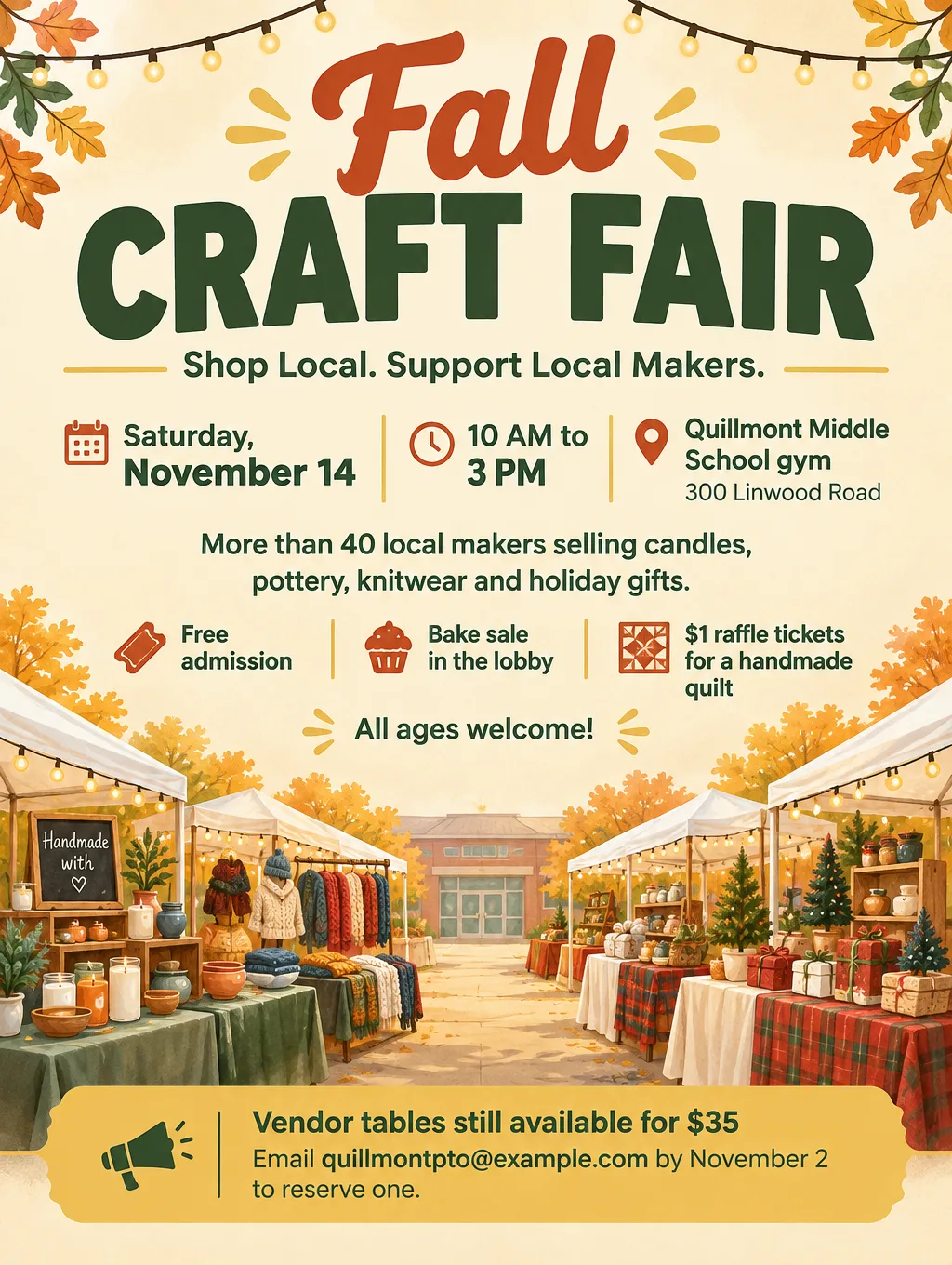
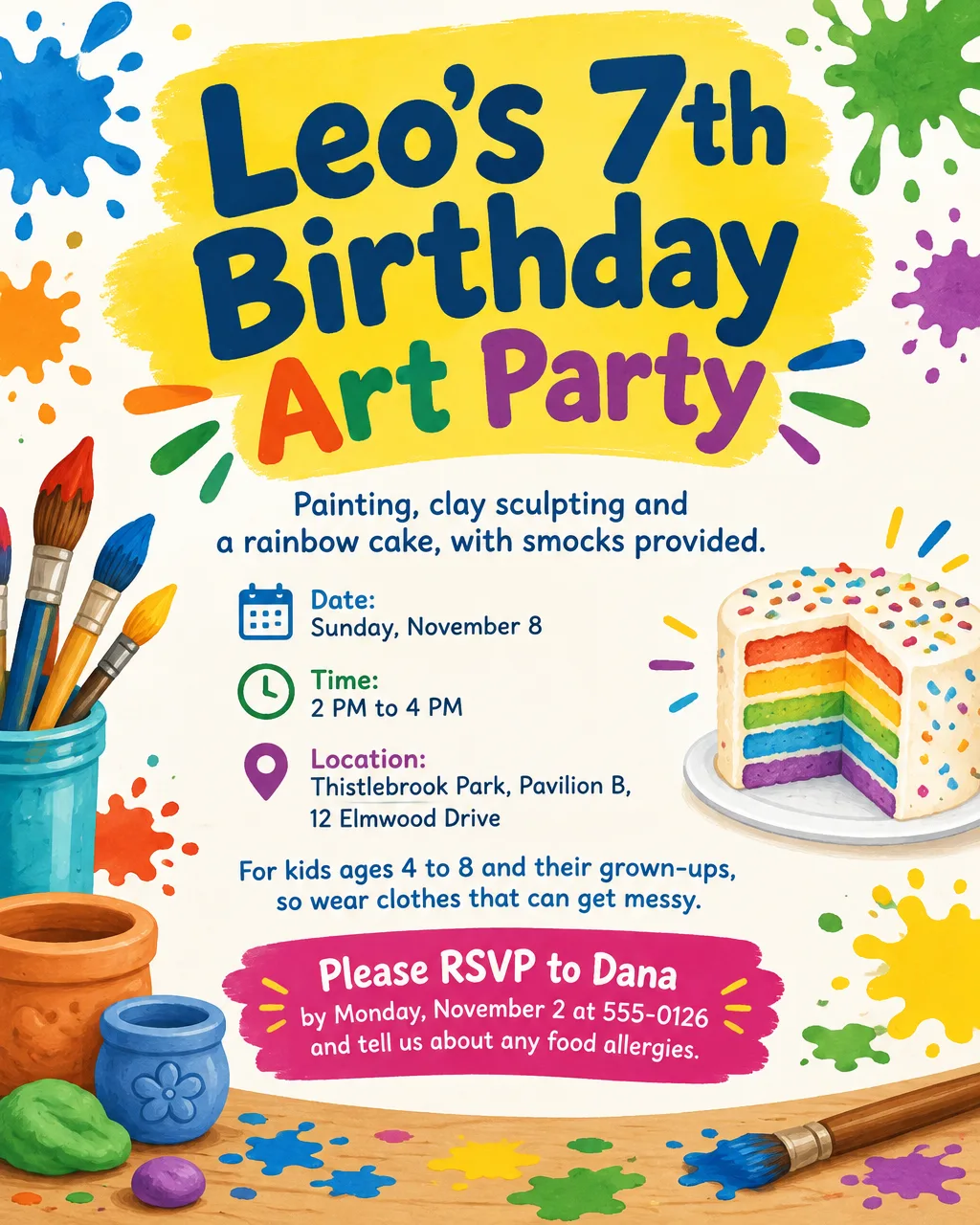
To make a flyer with AI, write down every fact the flyer must carry before you open a tool. Then pick a style for where the flyer will hang, generate it, fix what's wrong, proofread, and save it at the right size. Below are those five steps, a vague brief next to a specific one, design ideas by occasion, a size table, and fixes for the problems AI flyers run into most.
Ways to make a flyer with AI
AI flyer tools come in two kinds: ones that draft an editable template and ones that return a finished image. As of September 2026, the common choices work like this:
| Tool | You start with | You get | Fixing one word |
|---|---|---|---|
| ChatGPT | A typed description, or your own photo | One flat flyer image | Mark the area and ask for the change |
| Canva AI | A prompt, which returns up to 8 templates | Editable templates | Type over the line in the editor |
| Adobe Express | A prompt, using Generate template | Editable templates | Type over the line in the editor |
| Flyer Maker in Toybox AI | A description, plus an optional logo | One finished flyer image | Describe the change, or generate again |
If you're weighing ChatGPT specifically, the trade-offs are in can ChatGPT make a flyer. For prices and file types across more tools, see the roundup of AI flyer makers compared. The steps below work in any of them.
Step 1: Write the brief before you open a tool
A brief is the plain list of facts the flyer has to say. Write it in a note first, because a tool can't ask you what you left out. These are the items, in order of how big they should print:
- The name. "Fall Craft Fair" or "Harbor Street Tailoring Grand Opening", not "Join Us".
- Weekday and date. "Saturday, November 14". The weekday is what people check first.
- Start and end time. "10 AM to 3 PM". A start time alone leaves people guessing.
- The address, down to the door. Number, street, then the room or entrance: "Pavilion B" or "side door on Linwood Road".
- Who it's for. "All ages", "Grades 6 to 8", "Homeowners on the east side".
- The price or "Free". Give the exact amount, like "$8 at the door", or "Free" if it costs nothing.
- One call to action, word for word. "RSVP by November 2 at 555-0126", "Call to book", "Scan to register".
- One practical line. Parking, a rain date, "cash or card", food allergies. Pick the question you get asked most.
- The look, in a few words. "Warm autumn colors, one illustration of pumpkins, large date."
How to make a flyer for an event
An event flyer has to answer when, where and how much before anything else. Put the weekday and date second only to the event name, and give the end time so people know whether they can stop by after work. If the event needs a sign-up, the call to action is the registration link or phone number with a deadline. For a festival or fair, add the one detail that pulls people in, such as "40 local makers" or "free hayrides".
How to make a flyer for a party
Start a party flyer's brief with the reply line: who to tell and by when, like "RSVP to Dana by Monday, November 2". Give the guest of honor or the theme the biggest letters, then the date and time and the address. Add what guests need to show up ready: "swimsuits and towels", "costumes encouraged", "adults only". For a kids' party, ask about food allergies in the RSVP line. The flyer ideas by occasion have wording for birthdays, showers and holiday parties.
A vague brief vs a specific one
A vague brief gets a flyer with the gaps filled by guesses. Here's one:
"Make a flyer for our yard sale this weekend."
That leaves out the day, the hours, the address, what's for sale and how to reach you. Flyer Maker, for one, fills a missing detail with something rather than leaving a blank: a flyer with no call to action can come back with a button that literally says "CALL TO ACTION", and a missing time can become a label like "Time: Varies". It can also add a tagline you never wrote. Now the same flyer, specific:
Multi-Family Yard Sale on Juniper Court. Saturday, October 10, 7 AM to 1 PM, at 14 and 16 Juniper Court, off Alder Road. Furniture, kids' clothes, tools, books and a kayak, with everything priced to go. Cash or card accepted. No early birds before 7 AM. Rain date Sunday, October 11. Questions: text 555-0152. Bold, simple layout with the date and street in the largest type and a few illustrated price tags.Every line a stranger needs to find the sale is there, in the order they'll look for it. For more briefs built the same way, from bake sales to grand openings, see these AI flyer prompts.
Step 2: AI flyer design ideas by where it's seen
Pick the style for the place the flyer will be read, not for what looks good on your screen. A flyer on a telephone pole is read from a moving car; one in a group chat is read at arm's length. These pairings suit each place, with the matching settings if you use Flyer Maker:
| Flyer | Where it's seen | Design idea | In Flyer Maker |
|---|---|---|---|
| Yard sale | A pole or a sign at the corner | The date and street in huge type, three or four item words | Bold style, Light colors, Clean layout |
| Kids' birthday party | A parents' group chat | Theme art, the child's name and age biggest, an RSVP line | Party type, Playful style, Illustration pictures |
| Church or community potluck | A hallway bulletin board | One illustration, calm colors, date and time second-largest | Event type, Elegant or Playful style |
| Restaurant special | The front window and Instagram | A food photo with the price in large type | Restaurant type, Photos pictures |
| Gym or dance class schedule | The front desk and email | A grid of days and times | Fitness type, Packed layout |
| DJ night or club party | Instagram stories and poles at night | A dark background, neon color, the lineup in large type | Nightlife type, Dark colors |
| Grand opening | A shop window across the street | The opening date and the offer, nothing else big | Business type, Bold style |
Step 3: Generate the flyer and fix what's wrong
Generate once with the full brief, then fix one problem at a time. How you fix depends on the tool:
- Template tools (Canva, Adobe Express). The draft stays editable, so select the wrong line and type over it.
- ChatGPT. Open the image, mark the wrong spot using the selection tool and type what should replace it. OpenAI notes that an edit can spill outside the spot you marked, so reread the whole flyer after each one.
- Flyer Maker. Type the change into "Want to change something?" under the flyer, such as "change the date to Sunday, October 11", or reword your description and generate the flyer again.
If a fix keeps failing, change the brief instead of asking again. Shorter lines and fewer items give each word more room on the page.
Step 4: Check every fact before it prints
Proofreading is the step AI can't do for you, because it doesn't know which details are true. Check these against your note, one at a time:
- Weekday and date. Look them up on a calendar. "Saturday, October 10" is only right if October 10 is a Saturday.
- Time. Both a start and an end, each with AM or PM.
- Phone number. Read it digit by digit, then call it.
- Address. House number, street name and any room or entrance.
- Names and prices. Spelling of every name, every price and every discount.
- Lines you didn't write. Taglines, websites or labels the design added. Remove them.
- QR code. Scan it with two phones. A code the AI drew is decoration, not a link.
- Accents. In a Spanish or bilingual flyer, check á, é, ñ, ¿ and ¡ on every line.
Step 5: Save it at the right size for print or posting
Anything held in the hand should print at 300 pixels per inch, while 4OVER4's guide allows 150 when a poster hangs 3 to 5 feet from its readers. Multiply the inches by the pixels per inch to see what a file needs:
| Where it goes | Size | Pixels needed | In Flyer Maker |
|---|---|---|---|
| Board or door | 8.5 x 11 in | 2550 x 3300 at 300 per inch | Tall, 4K (2480 x 3312), letter at about 290 per inch after a slight trim |
| Card or invitation | 5 x 7 in | 1500 x 2100 at 300 per inch | Tall, 2K (1536 x 2048), about 290 per inch after trimming about 1/4 inch off the width |
| Poster | 18 x 24 in | 2700 x 3600 at 150 per inch | Tall, 4K, about 138 per inch, a little under that mark |
| Instagram feed | 4:5 portrait | 1080 x 1350 | Portrait, 2K or 4K for the full 1080-pixel width |
| Email and screens | Landscape | Depends on the email tool or screen | Wide |
Because Instagram accepts portrait posts up to 3:4 without cropping and stores them 1080 pixels across, both Portrait and Tall go up whole. Flyer Maker saves an RGB PNG with no bleed, crop marks or DPI setting. For printing, choose 2K or 4K, and if the design runs to the paper's edge, check with the shop how much it trims. For more paper sizes, see the flyer size guide.
Troubleshooting AI flyers
| Problem | Likely cause | Fix |
|---|---|---|
| A button says "CALL TO ACTION" | The brief had no call to action | Add the exact line, like "RSVP by November 2 at 555-0126" |
| A tagline you never wrote appears | The design filled empty space | Remove it with an edit, or give your own short tagline |
| The weekday doesn't match the date | A typo in the brief | Check a calendar, fix the brief, and fix the flyer |
| Text is too small to read from a few steps away | Too many details for one page | Cut to the checklist and move the rest to a website or QR code |
| The QR code doesn't scan | It was drawn as part of the image | Create a genuine code from your link and paste it over |
| The print looks soft | A 1K image printed at letter size | Make it at 4K, or print it smaller |
| Colors look duller on paper | A screen and a printer show color differently | Print one test copy before the whole stack |
How to make a flyer in Flyer Maker
- In Flyer Maker, put your brief in "Describe your flyer" (up to 3,000 characters), or speak it with the mic button in Chrome, Edge or Safari.
- Attach a logo with "Add your logo" if you have one. It usually lands small, near the top or bottom.
- Pick a Size: Tall ("Printing") for paper, Portrait ("Instagram post") for feeds, Wide ("Screens and email") for landscape.
- Expand More options to choose the Quality (2K or 4K for paper), Flyer type, Style, Colors, Pictures and Layout. There's no color picker for "My brand colors", so name your colors in the description, like "navy and gold".
- Type your phone number, website or address into "Contact info". Flyer Maker won't draw QR codes, so for one, turn on "Leave a blank square for your QR code" and paste your own in later.
- Tap "Create flyer" and expect it in about 30 seconds.
- Run the Step 4 checklist, and send any fix through "Want to change something?" (currently 60 credits for 1K, 70 for 2K, 90 for 4K).
Making the flyer currently costs 80 credits at 1K quality, with 2K at 90 and 4K at 100. Flyer Maker has no photo slot, so when the flyer needs your own picture, Smart Editor on a Pro plan is the route: upload the photo and give the flyer wording as the instruction.