A gym flyer ends up on the front desk, the locker room door, the community center board and in the member email. Gym owners, studio owners and class instructors make them to fill January memberships, launch a class or post the weekly schedule. The wording below covers each of those, plus the weight-loss and before-and-after claims to leave off unless you can back them up.
What to put on a gym flyer
The basics match any small business flyer, plus a few lines only gyms need. Largest first:
Must have
- One offer. "$0 enrollment through January 31" or "Your first week is free". Three deals on one flyer compete for the same space.
- The price and what it includes. "$29 a month, month-to-month, includes group classes." Write "no annual contract" only if your agreement says so.
- The dates. The last day of the offer, or the start date of the class or challenge.
- Address and parking. "Free lot behind the building" answers the next question.
- Hours. Staffed hours and member access hours if they differ ("Staffed 6 AM to 9 PM, members 24/7").
- How to sign up. The front desk, a phone line, or a QR code that opens your signup page.
Optional
- Who it's for. "Beginners welcome", "Adults 50 and up", "Teens 13 to 17 with a parent".
- What to bring. "Water, a towel and sneakers. Mats provided."
- Trial conditions, right beside the offer. "One free week per person, local residents 18 and up, photo ID at the desk."
- Childcare. "Kids' room 8 to 11 AM, $5 a visit."
- The instructor's name and certification on a class flyer.
- Languages. A class taught in Spanish, or a bilingual Spanish flyer for the membership drive.
Gym flyer ideas and wording
These gym flyer examples use made-up names, prices and dates. Replace them with yours.
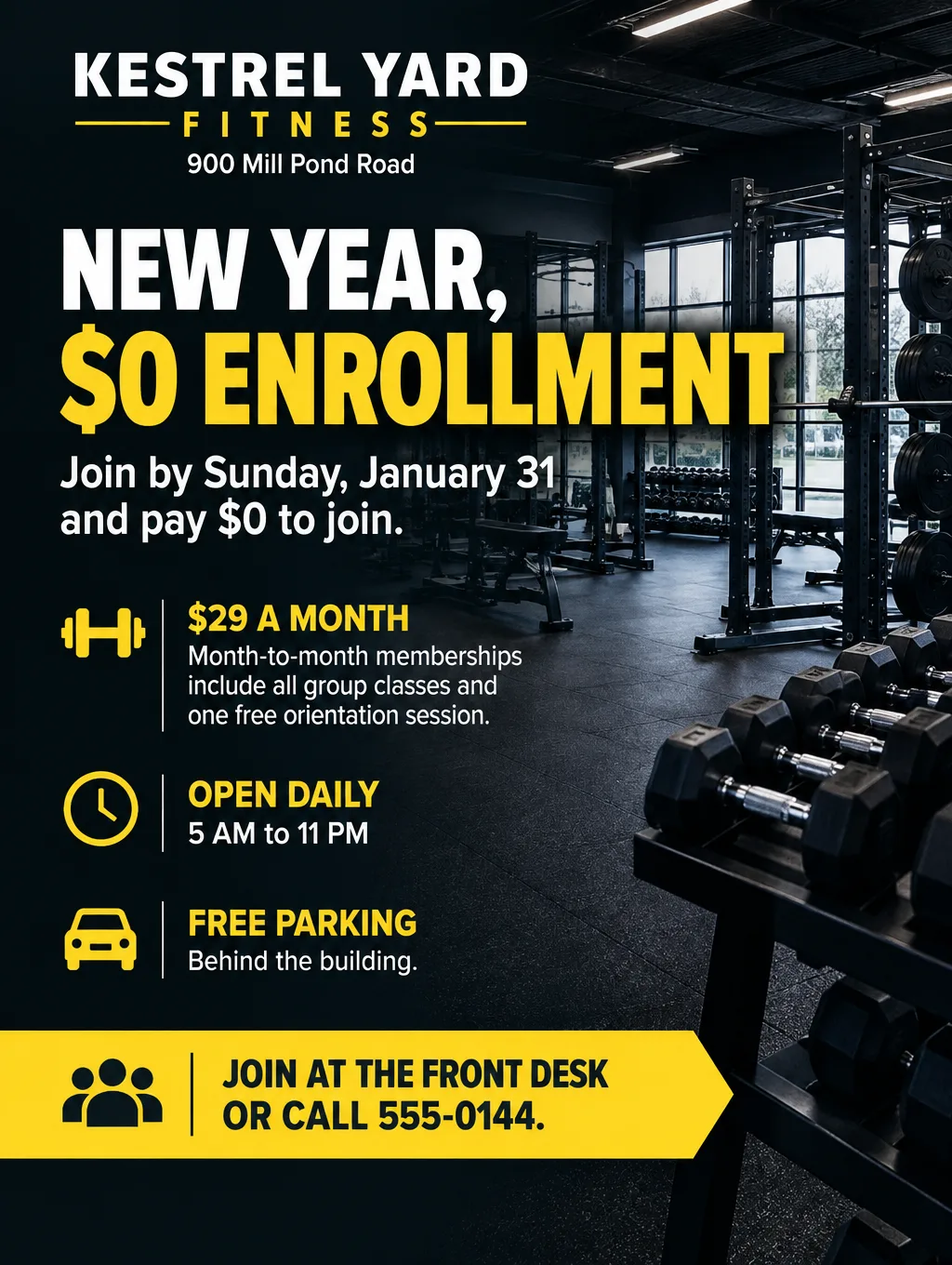
January membership drive
- Headlines: "New Year, $0 Enrollment" or "Join in January, Pay $0 to Start"
- Supporting line: "Join by Sunday, January 31. $29 a month, cancel with 30 days' notice."
- Call to action: "Sign up at the front desk, or scan to join."
Summer pass for students
- Headlines: "Summer Student Pass, $59" or "Train All Summer"
- Supporting line: "Unlimited gym and classes, June 1 to August 31, ages 16 to 22 with a school ID."
- Call to action: "Buy your pass at the front desk by June 15."
Free week pass or first class free
- Headlines: "Your First Week Is Free" or "Try Any Class Free"
- Supporting line: "One free week per person, local residents 18 and up. Bring a photo ID."
- Call to action: "Scan the code to claim your pass." Keep those conditions right beside the word "free" rather than in fine print along the bottom edge.
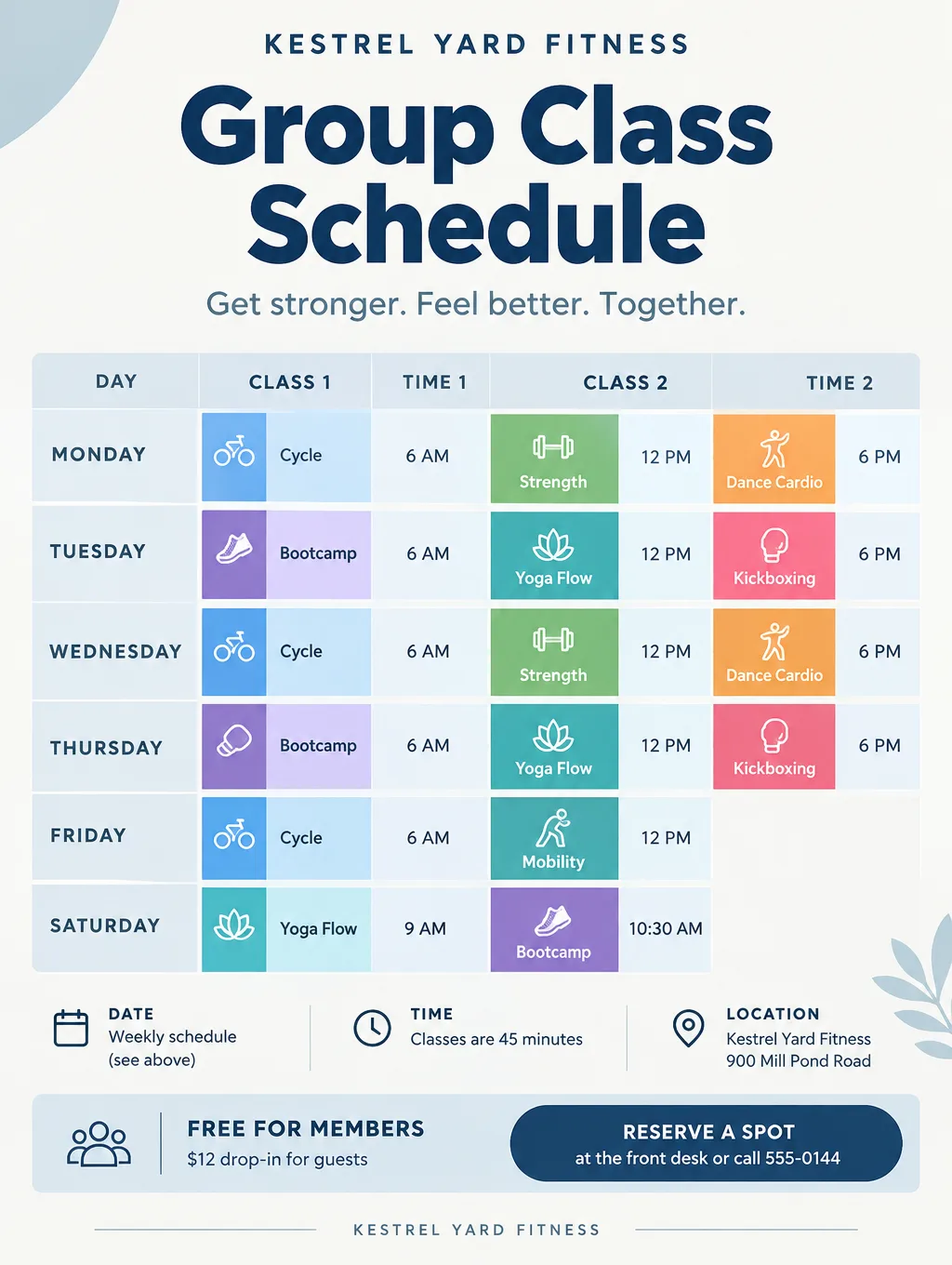
Class schedule flyer
- Headlines: "Group Class Schedule" or "November Classes"
- Supporting line: "Free for members. Drop-in $12. Classes are 45 minutes."
- Call to action: "Reserve a spot at the front desk." Lay the schedule out as a grid: days across the top, times down the side, one class per cell.
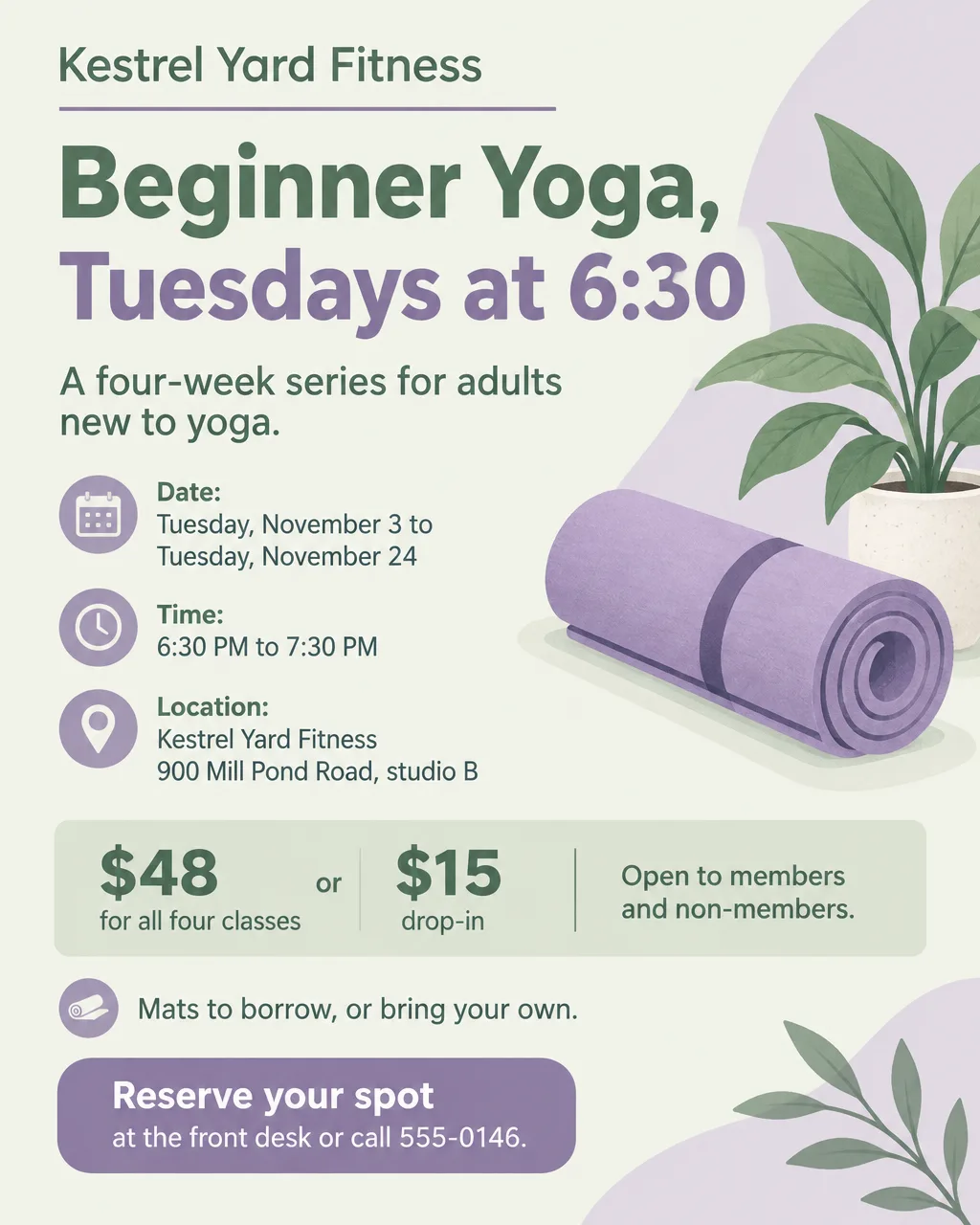
Flyer for a yoga class
- Headlines: "Beginner Yoga, Tuesdays at 6:30" or "Slow Flow Sundays"
- Supporting line: "A four-week series for new students. $48 for all four, $15 drop-in. Mats to borrow."
- Call to action: "Reserve your mat at the front desk."
A flyer for yoga also needs the style (vinyasa, yin, chair yoga) and whether the room is heated, since those tell people whether the class suits them. The United Nations marks June 21 as the International Day of Yoga, which gives a studio a natural date for a free community class: "Free Yoga on the Lawn, Monday, June 21, 7 AM".
Zumba flyers and dance fitness classes
- Headlines: "Dance Fitness, Thursdays at 7" or "Latin Dance Cardio Night"
- Supporting line: "45 minutes, all levels, no dance experience needed. $10 drop-in."
- Call to action: "Show up in sneakers with a water bottle."
Use your own class name, such as "Latin Dance Cardio", unless you're licensed to teach a branded program and follow its naming rules. Say what the class feels like in the supporting line, such as the music style and whether it includes jumping, so a beginner knows what to expect. Leave any brand's logo out of the AI description, since a drawn copy isn't the real mark. If you have the logo file and permission to use it, add it with "Add your logo".
Challenges, workshops and openings
- Headlines: "6-Week Strength Challenge", "Nutrition Basics Workshop" or "Bring a Friend Week"
- Supporting line: "Track your lifts and attendance. Prizes for the most classes attended."
- Call to action: "Sign up at the front desk. 30 spots."
Frame a challenge around what members do (classes attended, lifts logged), not pounds lost. A talk or clinic needs the extra details on the workshop flyer page, and a new location has its own grand opening flyer ideas. Trainers selling one-on-one sessions can use the personal trainer flyer page.
What not to promise on a gym flyer
Leave weight-loss numbers and before-and-after photos off the flyer unless you can back them up with your own records. Show typical results, not your best one. A member's story should match what most people who join can expect.
- "Results not typical" doesn't fix it. A small "your results will vary" under a big number still leaves the big number as the message. If you print a result, put what a typical member gets right beside it, in the same size type.
- Skip big pound counts. "Lost 40 pounds" reads as a promise to every stranger at the board. Print what members did instead, such as classes attended or lifts logged.
- Pictures make claims too. A before-and-after pair tells a reader "this will happen to you" without a single word, so it needs the same backing as a number.
- AI-drawn people aren't members. Flyer Maker's Photos setting makes new pictures of people and rooms. Don't present a generated face or body as a member or a result.
What a visitor can check on day one is safe to print: the price, the class times, the equipment and the coach's certification.
Gym flyer design tips
Build the schedule as a grid. Days across the top, times down the side, one class per cell, and one color per class type (cardio, strength, yoga). Flyer Maker can lay out a weekly schedule grid; choose the Packed layout to give it room, and read every time slot on the result before it goes up.
Show the room, not a body. A photo of the rack, the studio floor or a class seen from behind sells the space without implying a result anyone could hold you to.
Put the monthly rate next to the enrollment fee. "$29 a month, $0 to join" puts both costs of joining side by side. Leave one off and people have to ask at the desk.
Make a wide version for the lobby screen. Wide (5:4), the size Flyer Maker labels "Screens and email", suits a screen behind the front desk and the top of a member email, where a tall flyer would shrink.
Keep the schedule and the offer apart. Members need the schedule. Strangers need the offer. Put each on its own flyer.
Gym flyer sizes and printing
A gym uses letter pages for boards and doors, a wide image for screens and email, and a portrait image for Instagram.
| Use | Paper size | Pixels at 300 DPI | Setting |
|---|---|---|---|
| Front desk and community boards | 8.5 x 11 in | 2550 x 3300 | Tall (3:4), 4K |
| Schedule on the studio door | 8.5 x 11 in | 2550 x 3300 | Tall (3:4), 4K, Packed layout |
| Lobby screen and member email | Screen | None | Wide (5:4), 2K |
| Screen | None | Portrait (4:5), 1K |
The Tall shape at 4K measures 2480 x 3312 pixels, within a few percent of what a letter page needs at 300 DPI, with slim side margins because 3:4 is a little narrower than letter. For printing, choose 2K or 4K; a schedule with small type reads best at 4K. The flyer size guide lists more standard sizes.
More gym flyer prompts
Two more gym flyers for Flyer Maker. Change the invented gym, dates and prices to yours.
Bring a friend flyer for Kestrel Yard Fitness, 900 Mill Pond Road. Headline: "Bring a Friend Week". Monday, November 9 to Sunday, November 15, every member can bring one guest to any class or the weight room for free. Guests must be 18 or older and sign a waiver at the front desk. If your friend joins that week, you both get $10 off next month. Open daily 5 AM to 11 PM. Questions: call 555-0144. Energetic orange and navy design with an illustration of two water bottles and a pair of sneakers.Outdoor bootcamp flyer for Kestrel Yard Fitness. Headline: "Saturday Park Bootcamp". Every Saturday in October at 8 AM, at the Riverside Park pavilion, 1 Park Drive. 45 minutes of bodyweight circuits, all levels, $10 per class or free for members. Bring water and a towel. Class runs rain or shine unless there's lightning. Register at the front desk or call 555-0144. Bold green and white design with a photo of an empty park lawn at sunrise with cones set out.How to make a gym flyer in Flyer Maker
- Write the offer into the "Describe your flyer" box in Flyer Maker. Put the headline in quotes, then the price, the dates, the conditions, the address, the hours and how to sign up. For a schedule, list each day with its classes and times.
- Add your gym's logo with "Add your logo".
- Choose the size: Tall for boards and doors, Portrait for Instagram, Wide for the lobby screen and email.
- Open "More options" and pick Fitness as the Flyer type. Energetic suits a membership drive; Friendly suits a beginner class. For a class grid, choose Packed under Layout so the schedule has room.
- Type your phone number or signup link in "Contact info". Only the contact details you type get used, so paste the signup page for this offer rather than your home page.
- For an online signup, turn on "Leave a blank square for your QR code" and place your real code there after downloading. There's more on scannable codes in these QR code flyer tips.
- Click "Create flyer". Results arrive in about 30 seconds.
- Proofread every class name, time, price and date, and read the result for anything you didn't write, such as an extra slogan. Any plan can use the "Want to change something?" box under the flyer for a fix, at a current 60 credits for 1K, 70 for 2K or 90 for 4K. Rewriting the description and generating a fresh flyer is the other route.