A Christmas party flyer usually falls to whoever volunteered to organize: the office manager taping one to the break room fridge, a neighbor sliding copies under doors, a parent posting in the class group chat. It has to answer where, when and what to bring before anyone asks. Below is wording for office, ugly sweater and family parties, a neutral holiday party version for mixed workplaces, gift exchange rules you can paste, and print sizes. For Thanksgiving, Valentine's Day and the rest of the calendar, browse the holiday flyer ideas hub.
What to put on a Christmas party flyer
Write these down in this order before you think about colors. The first five are the ones guests need; the rest depend on the party.
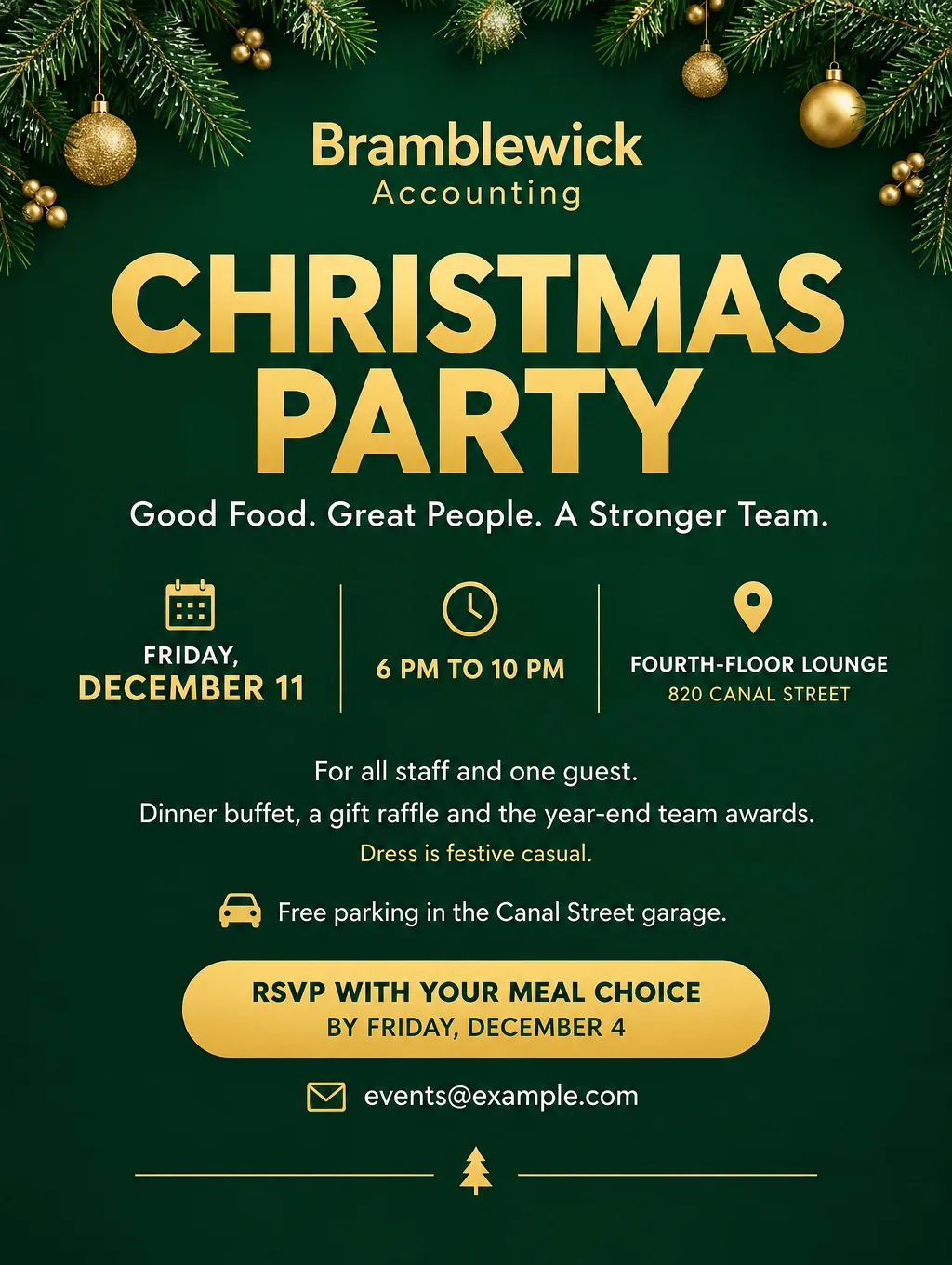
- Party name. Use the name people will search for in their inbox: "Bramblewick Accounting Christmas Party" beats "You're Invited".
- Weekday, date and start time. "Friday, December 11, 6 PM". Add an end time for office parties so people can book a sitter or a ride.
- Full address and the room. "Fourth-floor lounge, 820 Canal Street". For a house party, add a landmark guests will see from the street.
- Who is invited. "All staff and one guest", "Kids welcome", "Adults only". Partners and parents look for this line.
- RSVP deadline and one way to reply. "RSVP by Friday, December 4 at events@example.com". One method, not three.
- Food and drink. "Dinner buffet provided", "Potluck: sign up for a dish at the front desk", or "Bring a drink to share".
- Dress code or theme. "Festive casual", "Ugly sweaters encouraged", "Pajamas welcome".
- Gift exchange rules. The type, the price limit and whether to wrap it: "Secret Santa, $25 limit, wrapped with your recipient's name".
- Parking or transit. "Free parking in the Canal Street garage" saves the host a round of texts.
- One accessibility or allergy line. "Nut-free kitchen" or "Ramp entrance on Pine Street". Pick the one your guests need.
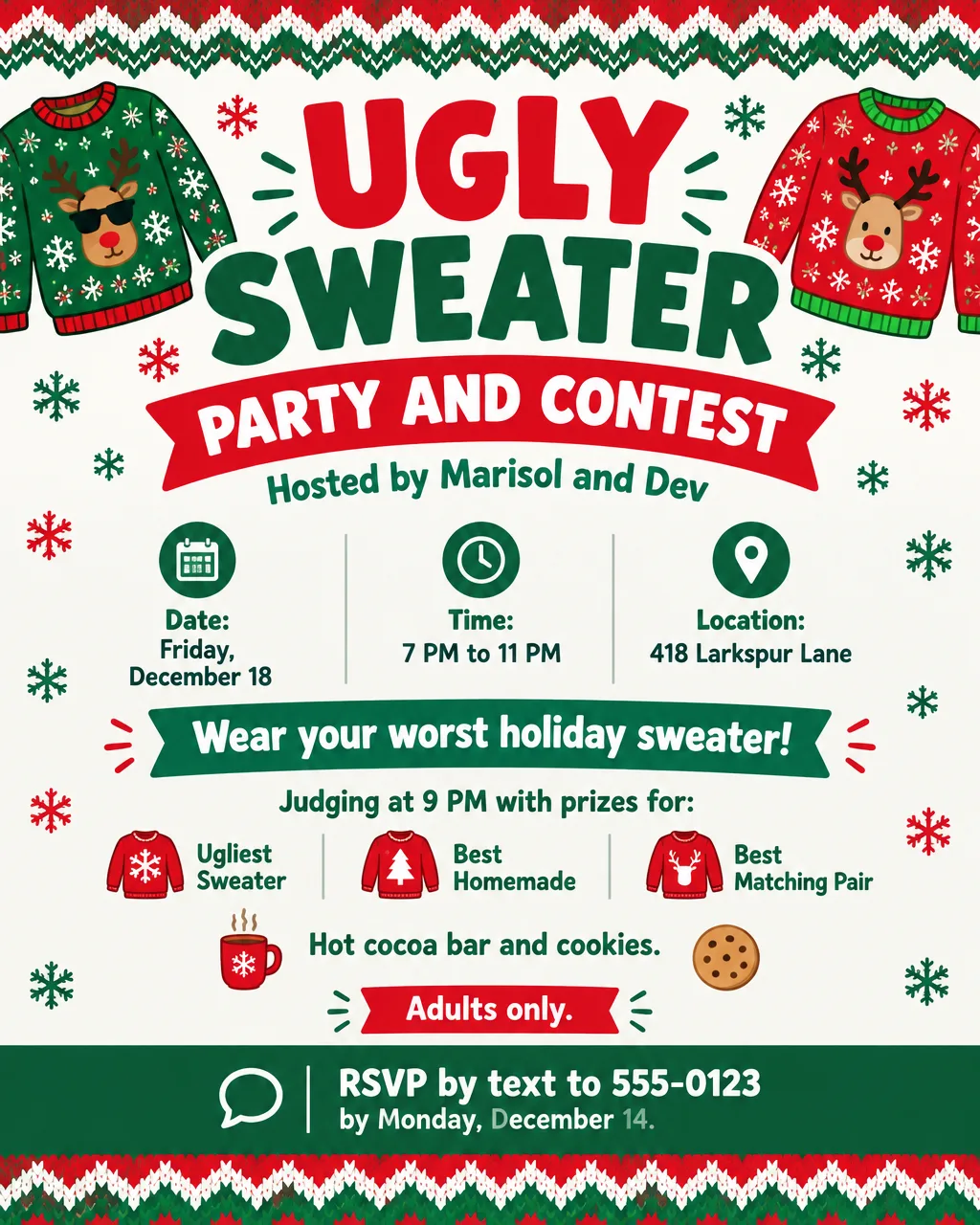
- Optional: a contest. Prize categories and judging time for an ugly sweater contest.
- Optional: a giving tie-in. "Bring a new, unwrapped toy for the building's toy drive". A separate toy drive flyer works better if collection runs for weeks.
- Optional: a QR square for the RSVP form or the potluck sign-up sheet.
Christmas party flyer ideas and wording
These are headlines and lines you can adapt, grouped by the kind of party. Swap the made-up names, streets and numbers for your own. Christmas Eve services, pageants and cantatas have their own page of church Christmas flyer ideas.
Office holiday party flyer ideas
An office flyer often needs two versions: a Christmas one and a neutral holiday party flyer for teams with mixed traditions. Hanukkah 2026 starts at sundown on Friday, December 4 and lasts through Saturday, December 12, so an office party on Friday, December 11 lands on its eighth night. For a latke party or a menorah lighting, use the Hanukkah flyer wording instead.
- Christmas headlines: "Bramblewick Accounting Christmas Party", "Christmas Dinner and Awards Night"
- Neutral headlines: "Year-End Holiday Party", "Winter Celebration", "Our Annual Holiday Lunch"
- Supporting line: "Dinner, a gift raffle and the year-end awards. Partners welcome."
- Supporting line for a daytime party: "Lunch is on us. The office closes at 3 PM that day."
- Call to action: "RSVP with your meal choice by Friday, December 4 at events@example.com"
Ugly sweater party flyer and contest wording
An ugly sweater party flyer should name the contest and its prizes, which gives guests a reason to find a sweater. National Ugly Christmas Sweater Day falls on the third Friday of December, which is Friday, December 18 in 2026, and it makes an easy date to build a party or an office contest around.
- Headlines: "Ugly Sweater Party", "The Ugly Sweater Showdown", "Wear Your Worst Sweater"
- Supporting line: "Judging at 9 PM. Prizes for Ugliest Sweater, Best Homemade and Best Matching Pair."
- Contest rules line: "Sweaters must be worn, not carried. Light-up sweaters count. One vote per guest."
- Call to action: "RSVP by text to 555-0123 by Monday, December 14"
A flyer for an ugly sweater contest at work swaps the party details for the contest ones: "Friday, December 18 at noon in the break room. Everyone votes. Sign up with Priya by Wednesday, December 16."
Family and kids' Christmas party
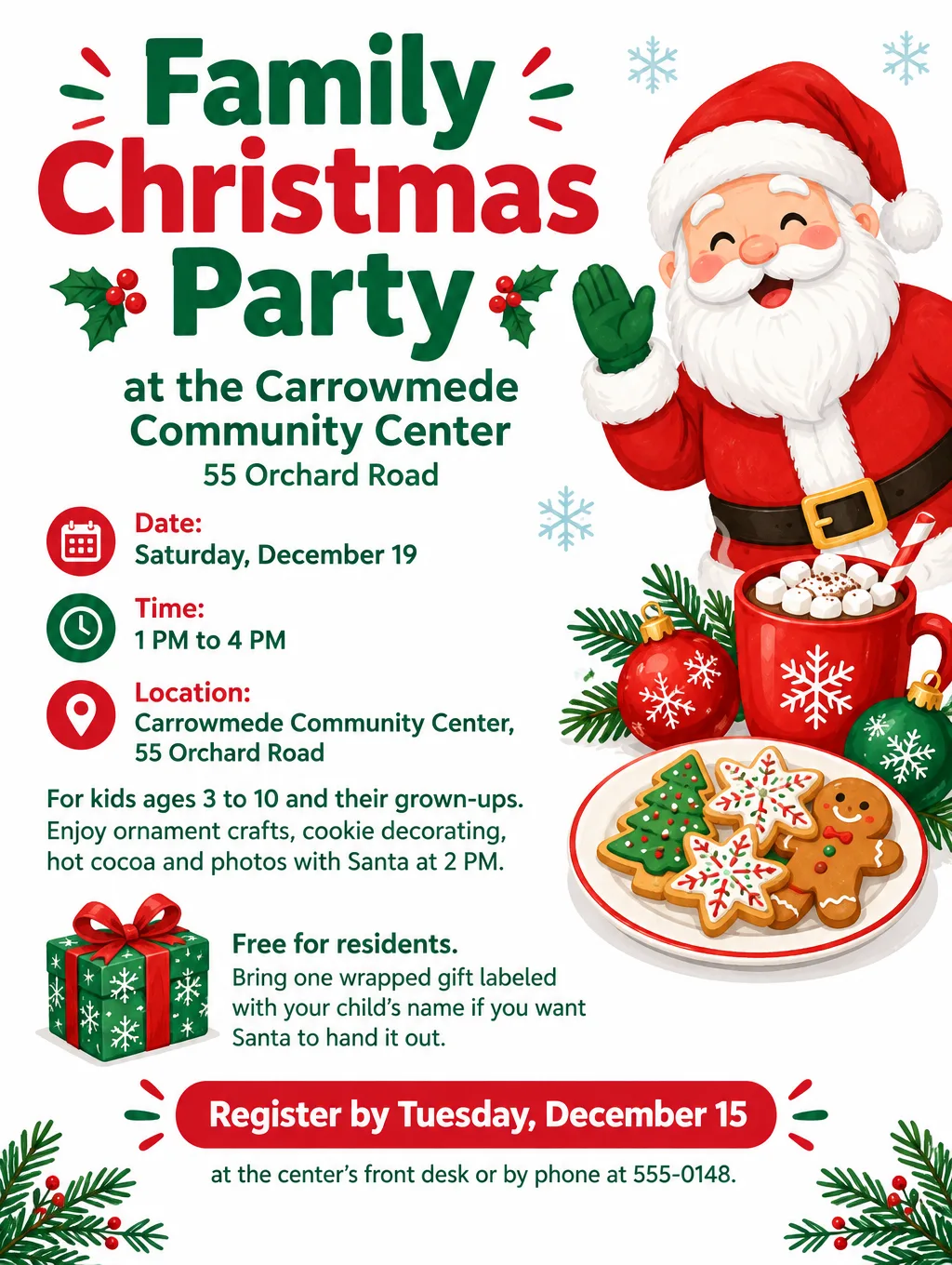
Parents want to know the ages, the activities and whether they stay. Name each activity with its time, so families who arrive late know what they'll still catch. When a pancake breakfast with Santa is the whole event, the breakfast with Santa flyer page has ticket and photo wording.
- Headlines: "Family Christmas Party", "Cookies, Crafts and Santa", "Kids' Christmas Afternoon"
- Supporting line: "Ages 3 to 10 with a grown-up. Ornament crafts, cookie decorating and photos with Santa at 2 PM."
- Gift line: "Bring one wrapped gift labeled with your child's name if you want Santa to hand it out. Keep it under $15."
- Call to action: "Free for residents. Register by Tuesday, December 15 at the center's front desk or by phone at 555-0148."
Neighborhood and friends' Christmas party
Drop-in parties need a window of time instead of a start time, and cookie swaps need a quantity.
- Headlines: "Christmas Open House", "Cookie Swap and Carols", "Deck the Block"
- Supporting line: "Drop in anytime from 2 to 5 PM. Coffee, cocoa and carols by the fireplace."
- Cookie swap line: "Bring 2 dozen homemade cookies and the recipe on a card. Go home with a mixed box."
- Call to action: "Reply to Aiko at 555-0162 by Thursday, December 10"
Gift exchange rules you can paste
Write the gift exchange rule in one or two sentences on the Christmas party flyer, so nobody has to ask the host.
- White elephant: "Bring one wrapped gift worth about $25. Draw a number at the door. On your turn, open a new gift or steal an opened one. A gift is frozen after its third owner."
- Secret Santa: "Sign up by Friday, December 4 to get your recipient's name. Spend $20 to $30. Gifts are opened at the party."
- Neutral gift swap: "Optional gift swap. Bring a wrapped $20 gift labeled 'for anyone' to join in."
Design tips for Christmas party flyers
Use a quiet Christmas party flyer background behind the details. Deep green, navy or burgundy with a small repeating pattern (pine sprigs, tiny snowflakes) keeps white or gold text readable. A photo of a lit tree behind the date turns the numbers into noise, so keep busy images in the top third or in a border.
Make the neutral version wintry, not Christmassy. Swap Santa, stockings and red with green for snowflakes, pine branches, string lights, and silver with blue. Keep the same layout and details so both versions read as one party.
Let the border show the dress code. A knit zigzag or snowflake border tells people it's an ugly sweater party before they read a word. Keep the panel with the date and address plain, since knit patterns behind text are hard to read.
Test it at group-chat size. Family and neighborhood party flyers are often shared only by text. Open the image on your own phone at arm's length, and if the RSVP date is hard to read, make it bigger or cut a line.
Put the RSVP deadline next to the RSVP method. "RSVP by Friday, December 4 at events@example.com" on one line is quicker to act on than a deadline in one corner and an email in another.
Keep the company logo small. A logo in the footer is enough for an office party. Flyer Maker usually sets an uploaded logo small in the header or footer, and that upload is meant for a logo, not a team photo.
Christmas party flyer sizes and printing
Office parties usually need one printed flyer for the break room and one image for email or chat. 4OVER4's print guide gives 300 DPI as the sharpness target for flyers, so a letter page needs 8.5 x 300 by 11 x 300, or 2550 x 3300 pixels.
| Where it's posted | Size | Pixels at 300 DPI | Setting to choose |
|---|---|---|---|
| Break room board, elevator, front door | Letter, 8.5 x 11 in | 2550 x 3300 | Tall (3:4), 4K |
| Printed invite in mailboxes or backpacks | 5 x 7 in | 1500 x 2100 | Tall (3:4), 2K |
| Group text, Slack or Facebook event | Phone screen | No print needed | Portrait (4:5), 1K |
| Email invitation | Screen | No print needed | Wide (5:4), 1K |
Tall at 4K is 2480 x 3312 px, a little short of the letter target, so it prints at about 290 pixels per inch with a slight trim. Tall at 2K is 1536 x 2048 px, which covers a 5 x 7 in card after trimming about 1/4 in off the width. GotPrint sells 5 x 7 in flyers if you'd rather order a stack of cards than print at home. A4, tabloid and poster dimensions, with their pixel counts, are in this flyer size reference.
More Christmas party flyer prompts
Paste one into Flyer Maker, then swap in your own names, dates and address. Each one spells out the RSVP line, because Flyer Maker fills a missing call to action with placeholder text.
A neutral office holiday party:
Year-End Holiday Party for the Quillmore Design team. Thursday, December 17, 4 PM to 7 PM, in the third-floor lounge at 90 Ferry Street. Food, drinks, a gift swap and team awards. Everyone welcome, partners included. Bring a wrapped gift under $20 to join the swap. RSVP by Thursday, December 10 at hello@example.com. Winter look with snowflakes, pine branches and string lights in silver and blue, with no Santa or Christmas symbols.A cookie swap open house:
Christmas Cookie Swap and Open House at the Nakamura home, 27 Hazel Court. Sunday, December 13, 2 PM to 5 PM. Bring 2 dozen homemade cookies and the recipe on a card, and go home with a mixed box. Coffee, cocoa and carols by the fireplace. Kids welcome. Reply to Aiko at 555-0162 by Thursday, December 10. Cranberry red on a cream background, with drawn cookie tins and frosted sugar cookies.A white elephant party for friends:
White Elephant Gift Exchange Party at Jordan's apartment, 1400 Pine Avenue, Apt 3B. Saturday, December 12, 7 PM to 11 PM. Bring one wrapped gift worth about $25. Draw a number at the door; on your turn, open a new gift or steal one, and a gift is frozen after its third owner. Snacks provided, bring a drink to share. Text 555-0177 to RSVP by Wednesday, December 9. Green, red and gold with wrapped presents and big bows.Common Christmas party flyer mistakes
- No RSVP date. Without one, there's no head count to give the caterer or the host. Pick a date a week ahead and print it.
- A gift exchange with no price limit. One $100 gift next to a $5 one is awkward for both people. Print the limit.
- The wrong weekday. December 11, 2026 is a Friday, not a Thursday. Check each weekday on a calendar, and check again after any edit.
- Christmas symbols on the flyer HR asked to keep neutral. Decide which version you're making before you design, and make both if the party has two audiences.
How to make a Christmas party flyer in Flyer Maker
- Open Flyer Maker and fill in "Describe your flyer". Copy in every detail from the checklist: the party name, the weekday and date, start and end times, the address and room, who's invited, food, dress code, gift rule and your exact RSVP line. The box takes up to 3,000 characters.
- Add your company logo with "Add your logo" for an office party. Skip it for a house party.
- Pick a Size for where it will be seen: Tall (3:4) for the break room board, Portrait (4:5) for the group chat, Wide (5:4) for an email.
- Change the defaults in "More options". Flyer type: Party. Style: Elegant for a dinner or Playful for an ugly sweater or kids' party. Colors: Dark for a green-and-gold look. Pictures: Illustration. For printing, choose 2K or 4K.
- Type the RSVP email or phone number into "Contact info". Flyer Maker uses only the contact details you type, so check that this one is current. If you have an online RSVP form, switch on "Leave a blank square for your QR code" and paste your real code in later; Flyer Maker won't draw one.
- Press "Create flyer". The design is usually ready in about 30 seconds.
- Check every date, time, address, price limit and email. Watch for a slogan or tagline that isn't yours, because Flyer Maker fills gaps in the description with its own text. To change something, type it in the box under your flyer (currently 60 credits, 70 for 2K, 90 for 4K), or edit your description and create a new one.
After the party, the next flyer is often the one for New Year's Eve. The New Year's Eve party flyer ideas cover bars, living-room countdowns and church services that night, and the AI Christmas card maker covers photo cards for the same families you just invited. To send the same text in Spanish, see how to make a Spanish or bilingual flyer, and for editing a ready-made layout by hand instead, the Canva alternatives comparison covers free template editors.