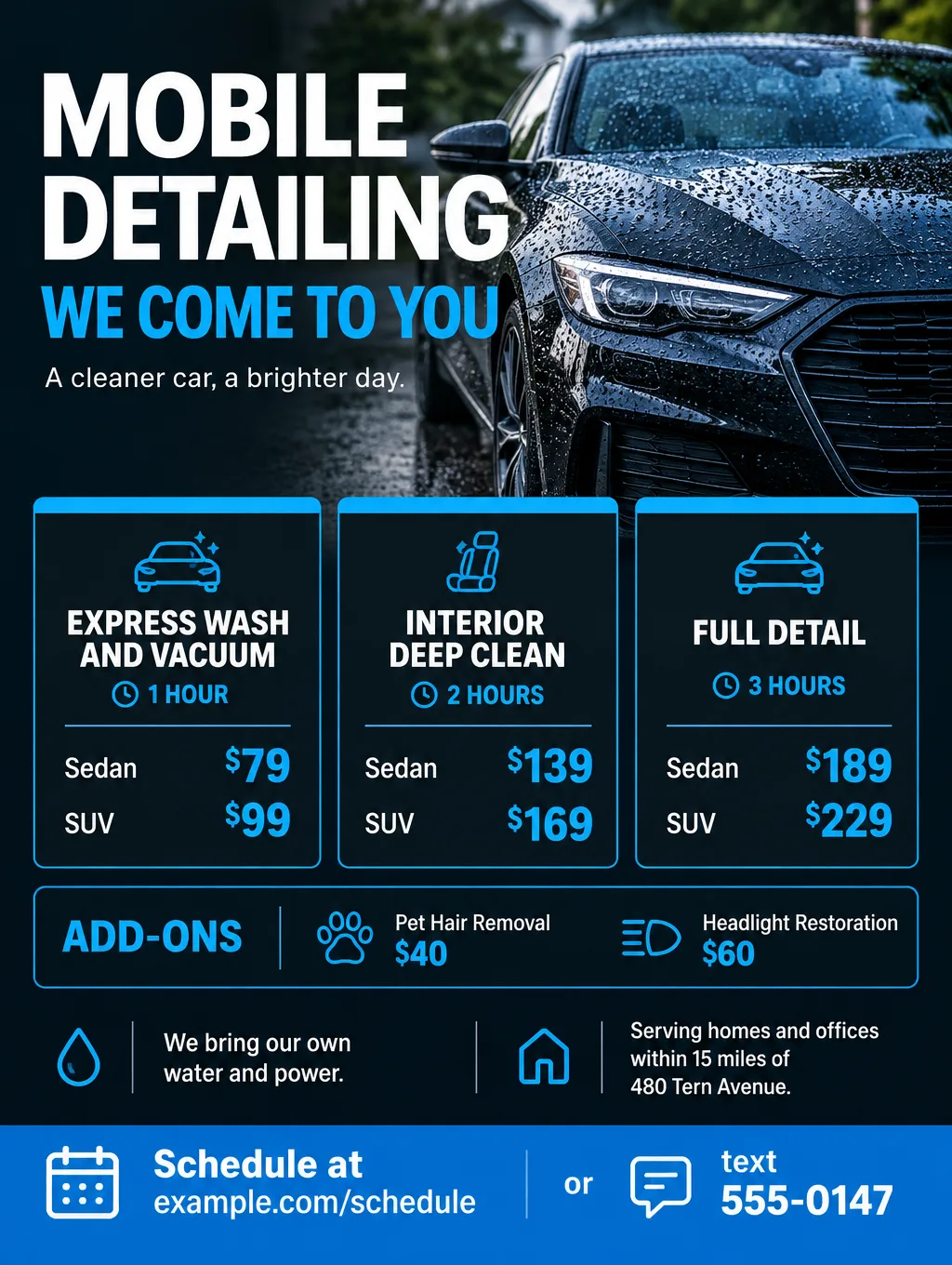


Car detailing flyers sell a finish and a convenience. A shop sells a package menu and a place to drop the car off; a mobile detailer sells the fact that the car never leaves the driveway. These flyers go on apartment and office boards, on counters at parts stores and barber shops, in neighborhood apps, and hand to hand after a job. Below: a checklist, car detailing flyer ideas and wording for mobile and shop work, the claims to leave off, sizes, and the steps in Flyer Maker. A fundraiser wash for a team or school belongs on the car wash flyer page instead.
What to put on car detailing flyers
Two lines set a detailing flyer apart from other small business flyers: prices by vehicle size, and the time each package takes. In order:
Must have
- Package names with what each includes. "Full detail: hand wash, clay bar, wax, full interior shampoo, windows."
- Prices by vehicle size. Sedan, SUV, truck or 3-row van. A single price leaves the SUV owner guessing.
- How long each package takes. "Full detail, about 3 hours." People plan their day around it.
- Where you work. For mobile service, a radius or neighborhoods. For a shop, the address, hours and whether customers wait or drop off.
- What you need at the car (mobile only). A parking spot with room to open every door, and whether you bring water and power.
- How to book. Text, call, or scan a code that opens your schedule.
- Add-ons with prices. Pet hair removal, headlight restoration, odor treatment, engine bay.
Optional
- A condition line. "Heavy pet hair or sand, add $40."
- A maintenance plan. "Every 4 weeks, $69 per visit."
- Payment methods. Card, cash, payment apps.
- Gift cards for the holidays. The gift certificate page covers design and wording.
- Fleet and dealer work, if you take it.
Car detailing flyer ideas and wording
These car detailing flyers examples use an invented business and prices. Replace them with your menu.
Mobile detailing flyer ideas
- Headlines: "Mobile Detailing, We Come to You" or "Your Car, Detailed in Your Driveway"
- Supporting line: "Full detail from $189. We bring water and power. Within 15 miles of Tern Avenue."
- Call to action: "Text 555-0147 or scan to book."
At apartment complexes and office parks, cars sit parked for hours, which suits a mobile detail. Ask the property manager before you post, and offer "we detail in your parking spot during work hours". If you also sell a wash-only package, "Mobile Car Wash and Detailing" names both services in one headline.
Shop package menu
- Headlines: "Detail Packages" or "Pick Your Detail"
- Supporting line: "Express $79, Interior $139, Full $189 for sedans. SUVs add $20 to $40."
- Call to action: "Drop off by 9 AM, ready by 3 PM. Call to book."
Maintenance plans
- Headlines: "Keep It Clean, Every 4 Weeks" or "Detail Club"
- Supporting line: "Wash, vacuum and interior wipe-down every 4 weeks, $69 per visit, cancel anytime."
- Call to action: "Ask about the plan after your next full detail."
Seasonal pushes
- Spring: "Pollen Season Wash and Interior Refresh, $99"
- Winter: "Salt Off: Undercarriage Rinse and Floor Mats, $59"
- Holidays: "Gift a Detail. Gift cards from $50."
Before you sell your car
- Headlines: "Detail It Before You List It" or "Listing Photo Detail"
- Supporting line: "Full detail plus engine bay and headlight restoration, $259 for sedans."
- Call to action: "Book 2 days before your listing photos."
Fleet and dealership work
- Headlines: "Fleet Washing on Your Lot" or "Lot-Ready Detailing for Dealers"
- Supporting line: "From $45 per vehicle, 5 vehicles minimum, weekly or every other week."
- Call to action: "Email for a fleet quote."
For washing the driveway the car sits on, a partner flyer from a pressure washing business can go out in the same neighborhood.
Claims to leave off an auto detailing flyer
Only print results you can back up with your own records or the product maker's published specs, and show typical results, not your best job. A money-back guarantee doesn't make a claim true, and health claims such as germ-killing need the most care.
- Durability numbers. "Ceramic coating lasts 5 years" needs evidence behind it. If the coating's maker publishes a warranty, quote its exact terms and name the product.
- "Removes all scratches." Paint correction removes light swirls; deep scratches may remain. Say "reduces swirls and light scratches".
- Germ claims. "Kills 99.9% of germs" is a health claim. Unless you have the product's test results, write "interior wipe-down with a disinfectant cleaner".
- "Like new." It's vague and hard to prove. A real photo of a car you detailed shows the finish instead.
Design tips for car detailing flyers
Build the price menu as a grid. Packages across the top, vehicle sizes down the side, one price per cell. Flyer Maker's Packed layout gives a menu like that room, and every price should be checked on the result.
Use a dark background with one bright accent. Black or charcoal with electric blue or gold suits detailing and keeps white price text readable.
Keep brands off the car. With Photos selected, Flyer Maker invents the vehicle, so describe "a dark sedan with no badges or logos". A drawn car also isn't your work. To show a real car you detailed, upload your photo of it to Smart Editor (Pro plan) and describe the headline and prices to add.
Write the service area in words. "Within 15 miles of Tern Avenue" or a list of neighborhoods reads faster than a map, and a map drawn by an image tool can put streets in the wrong places.
Leave a square for your booking code. A code that opens your calendar turns a board reader into a booking. Switch on "Leave a blank square for your QR code" and add the real code afterward. The QR code flyer page covers making the code and test-scanning a print.
Car detailing flyer sizes and printing
Start with a handout card, then add the board and social sizes.
| Where it goes | Size | Pixels at 300 DPI | In Flyer Maker |
|---|---|---|---|
| Handout card after a job | 4.2 x 5.5 in, landscape | 1650 x 1260 | Wide (5:4), 2K; trim about 0.2 in from the height |
| Apartment and office boards | Letter, 8.5 x 11 in | 2550 x 3300 | Tall (3:4), 4K |
| Instagram, Facebook, neighborhood apps | 4:5 portrait | Screen only | Portrait (4:5), 1K |
Of Vistaprint's standard postcard sizes, 4.2 x 5.5 inches is the closest to Flyer Maker's Wide shape. At 2K, Wide is 1,920 x 1,536 pixels, about 350 pixels per inch across a 5.5 inch card. For printing, choose 2K or 4K. The flyer size guide lists more sheet sizes.
More car detailing flyer prompts
Two more to try. Replace the business, prices and area with yours.
Maintenance plan flyer for Sheenwright Mobile Detailing. Headline: "Keep It Clean, Every 4 Weeks". Hand wash, vacuum, interior wipe-down and windows every 4 weeks at your home or office, $69 per visit for sedans, $84 for SUVs. Cancel anytime with a text. First visit must follow a full detail. Serving within 15 miles of 480 Tern Avenue. Text 555-0147 to join. Clean white and deep blue design with a photo of a vacuum and microfiber towels on a car seat.Pre-sale detailing flyer for Sheenwright Mobile Detailing. Headline: "Detail It Before You List It". Full detail plus engine bay cleaning and headlight restoration, $259 for sedans, $299 for SUVs and trucks. Book at least 2 days before your listing photos. We come to your driveway within 15 miles of 480 Tern Avenue and bring our own water and power. Schedule at example.com/schedule or text 555-0147. Bold black and silver design with a photo of a clean silver hatchback with no badges or logos in a driveway.How to make car detailing flyers in Flyer Maker
- Open Flyer Maker and fill in "Describe your flyer". Put the headline in quotes, followed by every package, its duration and its sedan and SUV prices, the add-ons, your service area and how to book.
- Upload the logo from your van or shop sign in "Add your logo".
- Pick a Size. Tall (3:4) for boards, Wide (5:4) for handout cards and email, Portrait (4:5) for social posts.
- Open "More options". Business works for a menu, Sale for gift cards and seasonal deals. Choose Packed layout for a price grid and 2K or 4K Quality to print.
- Type the phone number and scheduling link into "Contact info", and switch on "Leave a blank square for your QR code" if you'll add one.
- Select "Create flyer". Expect the design in about 30 seconds.
- Check each price cell against your rate sheet. A sedan price in the SUV column is the kind of slip that's easy to miss. Fix it with "Want to change something?" under the flyer (currently 60 credits, 70 for 2K, 90 for 4K), or correct the description and create it again.