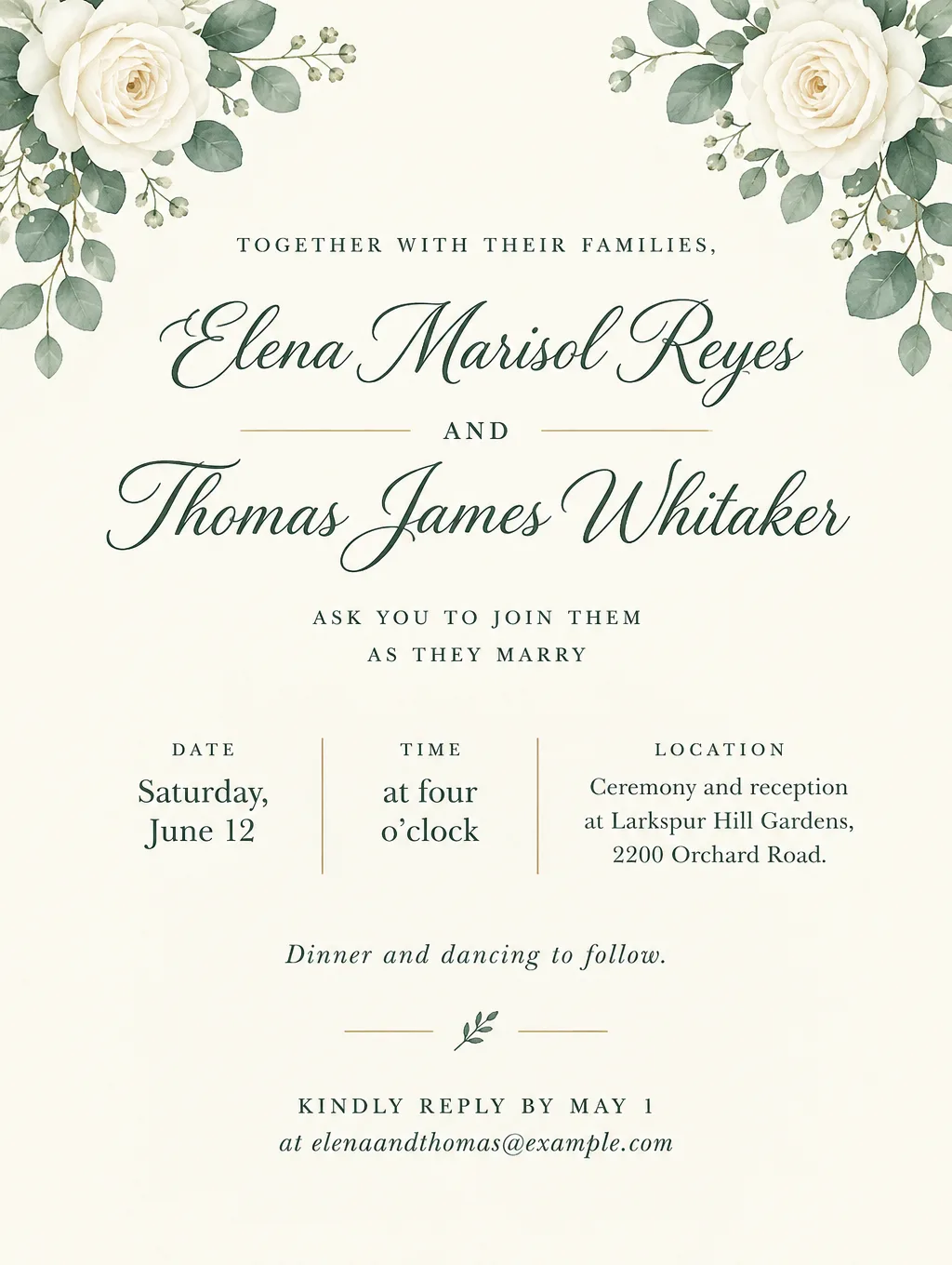
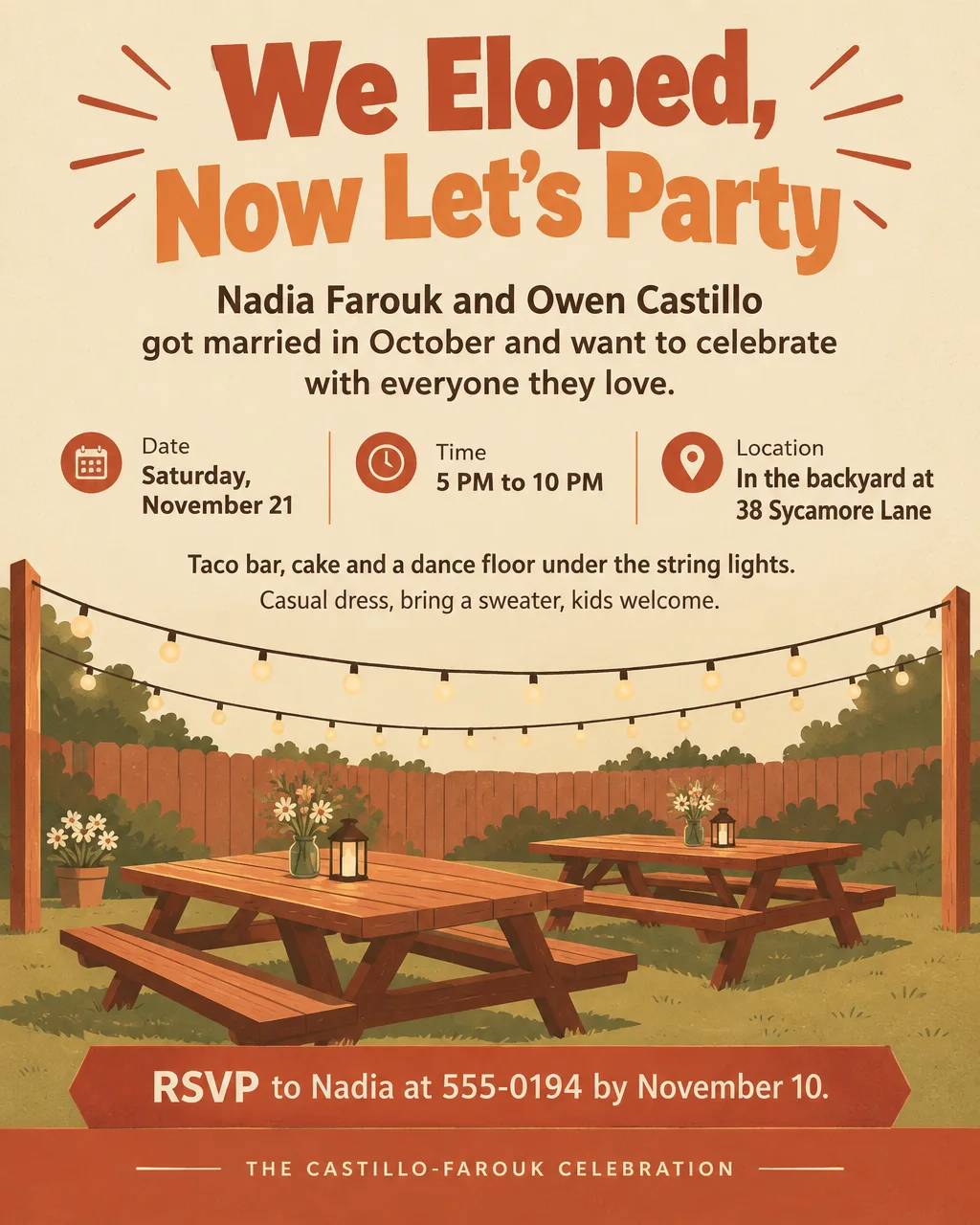
Wedding invitation AI takes the details you would give a stationer and returns a designed card. In Toybox AI, Flyer Maker designs the card from your wording, Smart Editor builds an invitation around your engagement photo, and Video Creator turns the finished card or a photo of the two of you into a short clip for phones. Every name, date and venue is drawn into the image rather than typed as text, so proofread each one before you order prints. For birthday, shower and party invitations, see the AI invitation maker page instead.
What you can make with wedding invitation AI
Flyer Maker designs the single-sided cards in the set. Smart Editor and Video Creator make the photo and video versions.
- Printed invitation cards. The main invitation, designed in the Tall size for a 5 x 7 card.
- Save the dates. A simpler card with both names, the date, the place and "Invitation to follow".
- Photo invitations. Your engagement photo with the invitation wording added, made in Smart Editor.
- Video invitations. The card or a couple photo as the first frame of a clip of 4, 6 or 8 seconds, made in Video Creator, for sending by text or WhatsApp.
- Rehearsal dinner and welcome party invitations. Smaller events with their own time and place.
- A weekend schedule for guests. One page with every event, address and shuttle time, handy for out-of-town guests.
- Bilingual invitations. English and Spanish on one card. Flyer Maker renders Spanish accents and ¿ ¡ correctly, but read every line anyway.
- Elopement and after-parties. A casual invitation to celebrate a wedding that already happened.
Wedding invitation wording that follows etiquette
Every wedding invitation answers four things: who is hosting, what the event is, where and when it is, and how to reply. That is the Emily Post Institute's list for formal and casual cards alike. The rest depends on how formal the wedding is.
| Style | Opening line | Date and time | Reply line |
|---|---|---|---|
| Formal, house of worship | "Mr. and Mrs. Daniel Thomas Reyes request the honour of your presence at the marriage of their daughter" | "Saturday, the fifth of June", the year in words, then "at half after four o'clock" | "RSVP" at the lower left, when a reception is included |
| Formal, other venue | "...request the pleasure of your company at the marriage of..." | Written out the same way, year included | A reply card in the envelope |
| Hosted by the couple and families | "Together with their families, Elena Reyes and Thomas Whitaker ask you to join them as they marry" | "Saturday, June 12, at four o'clock" | "Kindly reply by May 1" with an email or phone |
| Casual | "Elena and Thomas are getting married, and we'd love you there" | "June 12, 4 PM" | "Let us know by May 1" |
A few rules from the Emily Post Institute are easy to get wrong on a formal card. Write out the hosts' full names, middle names included, but keep "Mr." and "Mrs." abbreviated and spell out "Doctor". Skip phrases like "in the evening" after the time. Name the venue's city and state. Registry and gift details stay off the invitation.
Wedding invitation AI prompts for Flyer Maker
A wedding invitation AI prompt lists the card's lines top to bottom, one sentence each, in the order they will print. Wrap names in quotes when the spelling has to match, and include every line the card needs down to the reply date: when a line is missing, Flyer Maker fills the space with words of its own, such as an invented tagline. The samples skip the city and the year, so add yours, then swap in your own couple, dates and venue.
Formal church wedding
Formal wedding invitation card. Mr. and Mrs. Daniel Thomas Reyes request the honour of your presence at the marriage of their daughter Isabel Marie to Mr. Andrew Paul Lindqvist. Saturday, the fifth of June, at half after four o'clock. Saint Brigid's Church, 410 Chapel Street. Reception to follow at the Saltwicket Club, 16 Water Street. RSVP by May 1 at reyeslindqvist@example.com. Elegant style, white and gold, formal serif type, a thin gold border, no pictures.Rustic barn wedding
Wedding invitation card. Together with their families, Hannah Brooks and Caleb Moore invite you to their wedding. Saturday, September 18, at 4 PM, at Sorrelwind Farm, 8800 Hollow Road. Dinner, a bonfire and dancing in the barn to follow. Boots welcome. Please reply by August 14 at hannahandcaleb@example.com. Elegant style with warm cream, sage green and kraft brown, an illustrated wreath of wildflowers and wheat, handwritten-style script for the names.Save the date
Save the date card. Headline: "Save the Date". Priya Nair and Jonah Feld. Saturday, August 14. Lake Mira Lodge, 1 Shoreline Drive. Formal invitation to follow. Hotel and travel details at example.com/priyaandjonah. Minimal style, navy and white, a single illustrated sprig of olive leaves, the date as the biggest line after the names, lots of empty space.Bilingual English and Spanish invitation
Bilingual wedding invitation card in Spanish and English. "Lucía Hernández y Mateo Álvarez" in large script. Junto con sus familias, los invitan a celebrar su boda / Together with their families, they invite you to celebrate their wedding. Sábado 24 de abril, 5 PM / Saturday, April 24, 5 PM. Jardín Brisa de Olivo, 300 Avenida Central. Recepción a continuación / Reception to follow. Confirme antes del 20 de marzo al 555-0112 / Please reply by March 20 at 555-0112. Elegant style, ivory and dusty rose, illustrated bougainvillea in the corners.Rehearsal dinner
Rehearsal dinner invitation card. Headline: "Rehearsal Dinner". Please join the Lindqvist family for dinner the night before Isabel and Andrew's wedding. Friday, June 4, 7 PM to 10 PM, in the private room at Fennel and Salt Kitchen, 55 Market Street. Family, the wedding party and out-of-town guests. RSVP to Karen Lindqvist at 555-0183 by May 14. Elegant style, deep green and gold, one illustration of a candlelit long table.When a flyer for a wedding makes sense
A flyer for a wedding carries what a card can't: the whole weekend on one page for out-of-town guests, a notice in a church bulletin, or a sign at the venue door. Make it in the Portrait size to text it or print it on letter paper.
Wedding weekend schedule for out-of-town guests. Headline: "Hannah and Caleb's Wedding Weekend". Friday, May 21: welcome drinks at 7 PM, Copperwick Inn, 20 River Street. Saturday, May 22: ceremony at 4 PM and reception at 5:30 PM, Sorrelwind Farm, 8800 Hollow Road, shuttle from the inn at 3:15 PM. Sunday, May 23: farewell brunch at 10 AM at the inn. Questions: text Joelle at 555-0168. Clean layout, sage green and cream, a small illustrated wildflower in each corner.Photo and video wedding invitations
Photo and video invitations start from your own pictures instead of a text description, so they use Smart Editor and Video Creator, both on a Pro plan or higher.
A wedding invitation AI prompt with your photo
Flyer Maker's one image slot is for a logo, which usually lands small near the top or bottom of the design, so an engagement photo belongs in Smart Editor. Add the photo there and write the invitation as your instruction, for instance: "Make this photo our wedding invitation. Add "Elena and Thomas" in large ivory script across the top, and "Saturday, June 12, 4 PM, Larkspur Hill Gardens, 2200 Orchard Road. Kindly reply by May 1" in small letters on a soft white band along the bottom. Keep both faces, hair, the dress and the suit exactly the same."
For a 5 x 7 card, keep "Original" as the Shape with a vertical phone photo and pick 4K Quality; that returns roughly 2480 x 3312 pixels, well beyond what a 5 x 7 needs. Every edit redraws the whole photo, so compare both faces with the original before you order. The photo editor that keeps faces page has more instructions that protect a likeness. An HD edit is currently 85 credits, and 4K is 110.
How to make a wedding invitation video with AI
A wedding invitation video opens on your card or photo and brings it to life for a few seconds. Toybox's AI video maker for it is Video Creator, which is powered by Google Veo 3.1.
- Choose the start image. Toybox uses your first frame as it is, without cropping or resizing, so match its shape to the clip: a tall photo of the two of you for Vertical (9:16), or the card redrawn as Story (9:16) in Smart Editor and proofread again.
- In Video Creator, pick "Start from a photo" and add that image.
- Describe small, slow motion in "Describe your video". Google's Veo 3.1 guide lists camera terms such as "slow pan" and "dolly shot". For example: "Slow dolly shot toward the invitation card on a linen tablecloth in soft window light, a few white petals drifting past. The card and every word on it stay still and sharp."
- Pick the Format and Length. Vertical for phones, 8 seconds for the most time on the card.
- Watch the clip full screen and check that the names and date are still readable.
Each clip is a 720p MP4 and currently costs 350 credits. Clips come with sound, and there's no separate setting for it, so describe it in the prompt ("soft strings, no voices"). To use your own song instead, lower the clip's audio and add the song in a video editor. Because moving letters can blur, pair the clip with the still card. The animated flyer guide covers motion prompts that keep text readable, and image to video covers photo clips.
Printing invitation cards for a wedding
Among common card sizes, 5 x 7 inches comes closest to Flyer Maker's Tall (3:4) shape. Vistaprint's 5 x 7 invitation has a full-bleed size of 5.12 x 7.12 inches and a safety area of 4.88 x 6.88 inches; its other invitation sizes are 4.6 x 7.2 and 6 x 9.
| Invitation size | Size and quality to pick | Trim and sharpness |
|---|---|---|
| 5 x 7 in | Tall, 2K (1536 x 2048 px) | A quarter inch comes off the sides; close to 290 pixels per inch |
| 5 x 7 in, sharpest print | Tall, 4K (2480 x 3312 px) | Same quarter inch; over 400 pixels per inch |
| 6 x 9 in | Tall, 4K | Three quarters of an inch comes off the sides, so center the text |
| Sent by text, email or WhatsApp | Portrait, 1K | Nothing trimmed |
Put "all text kept well inside the edges" in the description, then check that no name or date sits near the left or right edge, since that's where the trim falls. The downloaded PNG comes without bleed or crop marks; ask the print shop to trim the same amount from each side. Order one printed proof before the full run.
Postage depends on the envelope's shape and what's inside it. USPS mail rules list the cases that cost extra as nonmachinable: a length under 1.3 or over 2.5 times the height (every square envelope), strings, clasps or buttons, and pieces too stiff to flex. The Emily Post Institute's advice is to have one fully stuffed invitation weighed at the post office before buying stamps, and to ask about hand-stamping, which leaves a different postmark than the sorting machines.
Tips for better AI wedding invitations
- Spell every name the way it should print. Include middle names on a formal card and accents on names like Lucía. Put the two names in quotes if they must match your spelling exactly.
- Ask for empty space. "Plenty of empty space" and "all text kept well inside the edges" give the trim room and keep the card from looking crowded.
- Give one way to reply, with a date. One email address or phone number and a date that leaves time for the caterer's head count.
- Match the style to the venue. A garden suits Elegant with Light colors, an evening ballroom Luxury with Dark, a backyard party Retro.
- Keep the same settings for every piece. Reuse the same Style, Colors and description wording for the save the date, the invitation and the schedule, so they look like a set.
- Read it aloud with a calendar open. Confirm the weekday for the date, the time for the venue booking, and each name letter by letter.
Limits to know
- Words are drawn into the design. A misspelled name gets fixed through the "Want to change something?" box under the card (currently 60 credits, 70 for 2K, 90 for 4K) or by editing the description and generating a new card.
- One card per run, not a matched suite. Each run designs a new card, so reuse the same wording and settings for every piece and check that they look alike before you print. For a full suite with envelope liners, foil or letterpress, a stationer is the better route.
- Replies and envelopes are on you. Toybox produces the design only; gather RSVPs by email, text or a wedding website, and address the envelopes by hand. The guide to AI tools for event planners covers timelines, vendor emails and other planning jobs.
- Photo and video invitations need a Pro plan. Flyer Maker cards work on the Free plan.
- Video text can blur. Keep the motion slow and small, and watch every clip before you send it.
How to make a wedding invitation in Flyer Maker
- Type the full wording into "Describe your flyer" in Flyer Maker. Order it the way it will print: hosts or families, both names, day and date, time, venue and street address, then the reply line.
- Pick Tall for the 5 x 7 print run, or Portrait if the card will only travel by phone.
- In "More options", choose 2K or 4K Quality for paper, Elegant or Luxury for Style, and Light, Dark or Pastel for Colors.
- Put the RSVP email or phone in "Contact info". Flyer Maker uses only the contact details you type there.
- Select "Create flyer". The card appears in roughly half a minute.
- Check names, weekday, date, time and address one by one, and correct mistakes in "Want to change something?" or in the description.
- Save the design to your gallery and download the PNG for the printer. Unsaved results stay available for 24 hours.