An AI invitation maker takes the party details you'd normally write on a card and returns a designed invitation. In Toybox AI, you type them into Flyer Maker and get one invitation image in about 30 seconds. Text it to the group chat as it is, or print it at home. A birthday invitation should go out 3 to 4 weeks before the party, which leaves time for either. Wording to copy, card sizes, postage and photo invitations follow.
What you can make with an AI invitation maker
Flyer Maker handles invitations that fit on one side of a card. Choose Party as the Flyer type for all of these.
- Kids' birthday invitations. Theme, age, a start and end time, and an RSVP line for parents. As a birthday invitation maker it suits personal invites; for a public event poster, such as a party at a park that anyone can join, see birthday party flyer ideas.
- Milestone and surprise parties. A 40th dinner or a surprise 60th, with "Shh, it's a surprise" and the time guests should arrive.
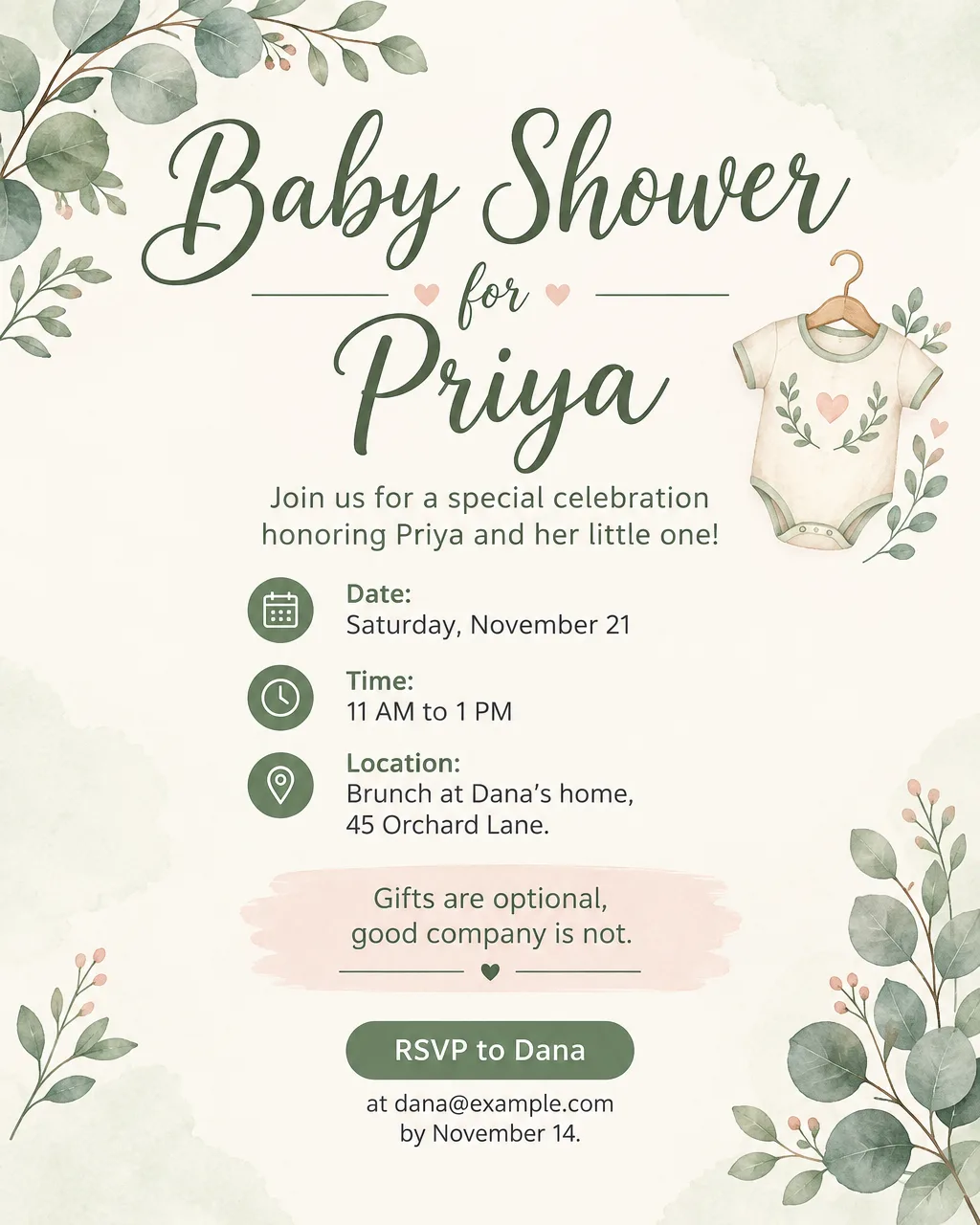
- Baby showers. The honoree, the host, the meal and an RSVP contact. Baby shower flyer wording has more headline ideas.
- Holiday and New Year's Eve parties. As a party invitation maker it handles dress codes and "bring a dish" lines; the New Year's Eve party flyer page covers the countdown-party details.
- Save the dates and rehearsal dinners. A simple card with names, the date and "invitation to follow". For a full wedding suite, see AI wedding invitation ideas.
- Bilingual invitations. A quinceañera or baptism invitation in Spanish and English on one card. Accents and ¿ ¡ come out correctly, but proofread every word.
A flyer or a card for a birthday invitation
Sent to a group chat or posted on a class page, a birthday flyer invitation is a single image. A card is that same design, printed and handed out. Flyer Maker makes one file for both, so decide early whether you'll print: printing needs 2K or 4K quality and the Tall size, while a texted invite works at 1K.
Invitation wording you can copy
Short lines read better on a card. Every name, date and place below is invented, so replace them with your own.
| Occasion | Headline | Details line | RSVP line |
|---|---|---|---|
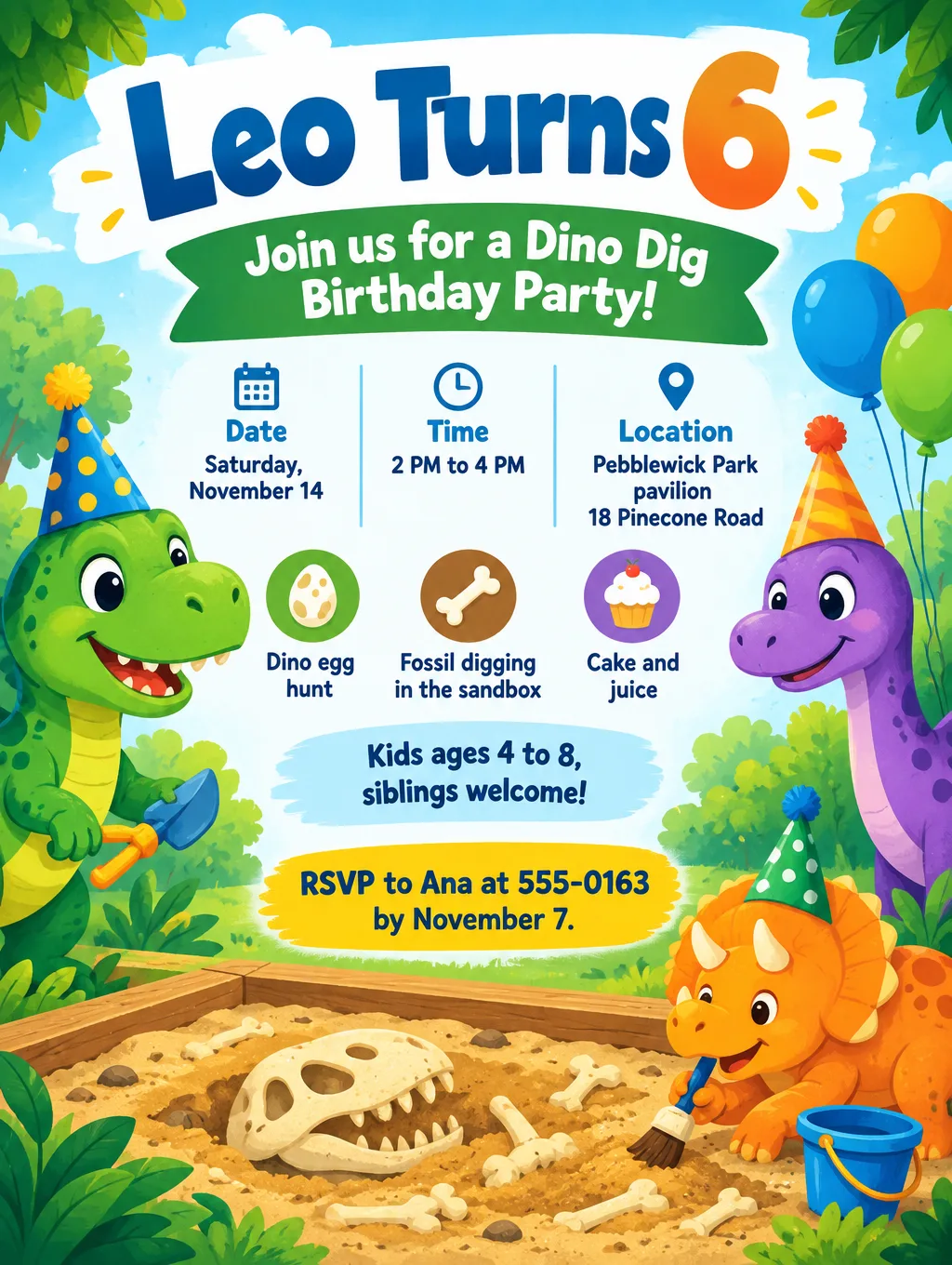
| Kids' birthday | "Leo Turns 6" | "Saturday, November 14, 2 to 4 PM, Pebblewick Park pavilion" | "RSVP to Ana by November 7, 555-0163" |
| Surprise 50th | "Shh, It's Mark's Surprise 50th" | "Friday, November 20, 7 PM. Arrive by 6:45; he walks in at 7." | "RSVP to Jen by November 13, and keep it quiet" |
| Baby shower | "Baby Shower for Priya" | "Saturday, November 21, 11 AM brunch at Dana's" | "RSVP to dana@example.com by November 14" |
| Holiday open house | "Cookies and Cocoa Open House" | "Saturday, December 12, 3 to 6 PM. Kids welcome." | "Text 555-0177 so we bake enough" |
| New Year's Eve | "Ring In the New Year" | "Thursday, December 31, 9 PM to 1 AM. Cocktail attire." | "RSVP by December 20" |
| Housewarming | "Come See the New Place" | "Sunday, November 15, 1 to 5 PM, 18 Orchard Lane" | "Bring a friend; just text 555-0184" |
| Save the date | "Save the Date: Sam and Riley" | "June 12. Formal invitation to follow." | "Watch your mailbox in the spring" |
Three habits make any of these clearer:
- Give an end time for kids' parties. Parents plan pickup around it.
- Say who's invited. "Siblings welcome", "Adults only" or "Plus-ones welcome" saves a dozen texts.
- Offer one way to RSVP, with a date. One phone number or one email, not three.
When to send each kind of invitation
Send a birthday invitation 3 to 4 weeks before the party, and a baby shower invitation 4 to 6 weeks ahead. These are Vistaprint's lead times by occasion:
| Occasion | Send the invitation |
|---|---|
| Housewarming | 2 to 3 weeks before |
| Birthday | 3 to 4 weeks before |
| Graduation party | 3 to 4 weeks before |
| Baby or bridal shower | 4 to 6 weeks before |
| Wedding save the date | 6 to 8 months before (12 for a destination wedding) |
| Wedding invitation | 3 to 4 months before |
Set the RSVP date about a week before you need a head count for food or the venue, and print that date on the invitation. A texted invitation can go out on the same schedule; the lead time is for your guests' calendars, not the mail.
Tips for better AI invitations
- Type names exactly as they should print, in quotes. Headline: "Leo Turns 6". Spell an unusual name twice in the description if it matters, and check it letter by letter on the result.
- Describe original art. Ask for "original cartoon dinosaurs in party hats", not a character from a film or show, and never describe a brand's logo.
- Give the full address and an entry note. "Pebblewick Park pavilion, 18 Pinecone Road, park in the north lot" beats "at the park".
- Pick a style that fits the guest list. Playful style with Vibrant colors for kids, Elegant with Pastel for showers, Luxury with Dark colors for a New Year's Eve party.
- Put the RSVP contact in "Contact info". Flyer Maker uses only the contact details you type, so check every digit of the number on the result.
- Write the RSVP deadline as a weekday and date. "RSVP by Saturday, November 7" is harder to misread than "RSVP by the 7th", and you can check the weekday against a calendar.
Using an AI invitation maker with a photo
Flyer Maker can't hold a portrait of the birthday child. Its one upload, "Add your logo", sets that image small near the top or bottom of the design. When the invitation should show a real snapshot or an engagement photo, Smart Editor is the tool: upload the photo, then type the invitation wording into "What should change?".
Write the instruction the way the finished card should read, and say what must not change: "Make this photo a birthday invitation. Put "Leo Turns 6" across the top in big playful letters and "Saturday, November 14, 2 to 4 PM, Pebblewick Park pavilion, RSVP to 555-0163" along the bottom, with a few balloons in the corners. Don't change his face, hair or smile."
For an 8 x 10 print, choose Social (4:5) under Shape and 4K under Quality in More options. The file is 2560 x 3200 px, which is 320 pixels per inch at 8 x 10. Printed on a 5 x 7 card instead, the same 4:5 image has about 0.6 inch cut from its width. Each edit redraws the entire photo, so check the eyes and smile against the original before ordering prints. Smart Editor is on Pro plans and up, currently 85 credits per HD edit or 110 in 4K. Use only photos you have permission for: Toybox's Terms ban generating images of real people without their explicit consent, and for a child that permission comes from a parent.
Invitation sizes, printing and postage
Vistaprint's printed invitations come in sizes including 5 x 7, 4 x 8, 6 x 9 and 5.5 x 4 inches. Flyer Maker's Tall (3:4) design matches the 5 x 7 card closely, while 4 x 8 and 6 x 9 cards are narrower shapes that would cut off much of the sides.
| Card | Flyer Maker setting | How it fits |
|---|---|---|
| 5 x 7 in | Tall, 2K or 4K | About 1/4 in trimmed from the width; about 290 pixels per inch at 2K |
| 4 x 6 in | Tall, 2K | About 1/2 in trimmed from the width |
| 8 x 10 in | Portrait, 4K | Exact fit at 320 pixels per inch |
| Text, email or group chat | Tall or Portrait, 1K | No trim |
Trimming comes off the sides, so write "keep all text away from the left and right edges" in your description when you plan to print on a 4 x 6 card. The PNG has no bleed, so for color that runs to the paper's edge, ask the print shop about margins first. Flyer Maker isn't an invitation card maker that prints and mails cards for you: it gives you the design file, and a print shop or stationery site does the printing.
Postage follows the card's shape. USPS charges card prices only for cards from 3.5 x 5 up to 4.25 x 6 inches, so a 5 x 7 invitation goes as a letter. USPS also treats a letter as nonmachinable when its length divided by its height is under 1.3 or over 2.5, which puts square envelopes into the surcharge category. A 5 x 7 card in a rectangular envelope sized for it stays in range, since 7 divided by 5 is 1.4. Letters longer than 6 inches or taller than 4.25 inches must also be at least 0.009 inch thick to avoid that surcharge.
Limits to know
- The wording is part of the image. Fixing a misspelled name takes a new version: describe the correction in "Want to change something?" (currently 60 credits, 70 for 2K, 90 for 4K), or fix the name in your description and create the invitation again.
- No RSVP tracking or mailing. Toybox makes the invitation image. Collect replies by text or email, or use an online invitation service if you want a guest list that updates itself.
- One design per run. For a matching thank-you card, reuse the same style lines and More options settings, and expect the second design to differ in small ways.
- Formal wedding stationery is a different job. Foil, letterpress, envelope liners and a full invitation suite belong with a stationer. Flyer Maker suits the save the date, the rehearsal dinner or the welcome party.
- Photo invitations are a Pro plan job. They go through Smart Editor. On the Free plan, Flyer Maker invitations use illustration, color and type instead of your photo.
More invitation prompts
Paste either prompt into Flyer Maker and change the names, dates and places.
Surprise 50th birthday invitation for Mark. Headline: "Shh, It's a Surprise". Friday, November 20, 7 PM, at Larchwick Community Hall, 310 Mill Street. Arrive by 6:45 PM; Mark walks in at 7. Dinner and dessert provided. RSVP to Jen at 555-0172 by November 13 and keep it quiet. Deep navy and gold, elegant style, gold confetti and a large gold "50".Bilingual quinceañera invitation in Spanish and English for Sofía. Headline: "Mis XV Años / My Quinceañera". Sábado 16 de enero, 6 PM / Saturday, January 16, 6 PM. Dinner and dancing at Larchwick Community Hall, 310 Mill Street. Confirma tu asistencia con Laura al 555-0179 antes del 2 de enero / RSVP to Laura at 555-0179 by January 2. Elegant rose gold and ivory with a small tiara and flowers, formal script type.How to make an invitation in Flyer Maker
- Write the invitation in the "Describe your flyer" box of Flyer Maker. Lead with the name or occasion in quotes, then the day and date, time, place, who's invited, and the RSVP contact and deadline.
- Choose the size. Tall (3:4) for 5 x 7 and 4 x 6 cards, Portrait (4:5) for 8 x 10 prints or a group chat.
- Open "More options" and set Flyer type to Party. Then pick the Style and Colors for the occasion, and Quality: 2K or 4K if you'll print.
- Type the RSVP phone or email into "Contact info", then read it back character by character on the finished invitation.
- Select "Create flyer" and wait about 30 seconds for the invitation.
- Proofread every name, weekday, date, time and address. Check that the weekday matches the date on a calendar.
- Download the PNG to print or text, or fix a detail first in "Want to change something?".