Restaurant flyers work when they sell one thing: taco night, a lunch combo, holiday catering, a new delivery zone. They get read in takeout bags, on the counter by the register, taped inside the front window and shared in neighborhood groups. Below is what to put on one, wording for common promotions, design and size notes, where to post and mail them, and step-by-step instructions for Flyer Maker at the end.
What to put on a restaurant flyer
List the details first and pick the look later. In order of importance:
Must have
- The deal, as the headline. "Taco Tuesday: 3 for $9" does more work than the restaurant's name in big letters.
- The price or the deal terms. Dine-in only, pickup only, one per table, or "excludes drinks". Customers ask about these at the register.
- When it runs. Days and hours ("Tuesdays, 4 PM to close"), and an end date for anything limited.
- Where. Restaurant name, street address and the cross street. Add a parking line if parking is hard.
- How to order or claim it. A pickup phone number, "order at the counter", "show this flyer", or a code for online orders.
- A photo of the real dish. The plate you'll actually hand over, not a stock photo of someone else's food.
Optional
- Delivery area and minimum. "Delivery within 3 miles, $15 minimum."
- Opening hours, if the flyer is going to people who don't know you yet.
- Dietary marks. V, GF, or "ask us about nut allergies".
- A QR code to your menu or online ordering, in a blank square you leave for it.
- An expiration line on coupons. "Valid through November 30."
A flyer isn't a menu. For the full list of dishes with prices, use the AI menu maker and keep the flyer to one offer.
Restaurant flyer ideas and wording
These restaurant flyer ideas cover the promotions restaurants run most, and they work as flyer ideas for food businesses of any size, from a bakery counter to an ice cream shop. Swap the invented names and prices for your own.
| Occasion | Headline | Supporting line |
|---|---|---|
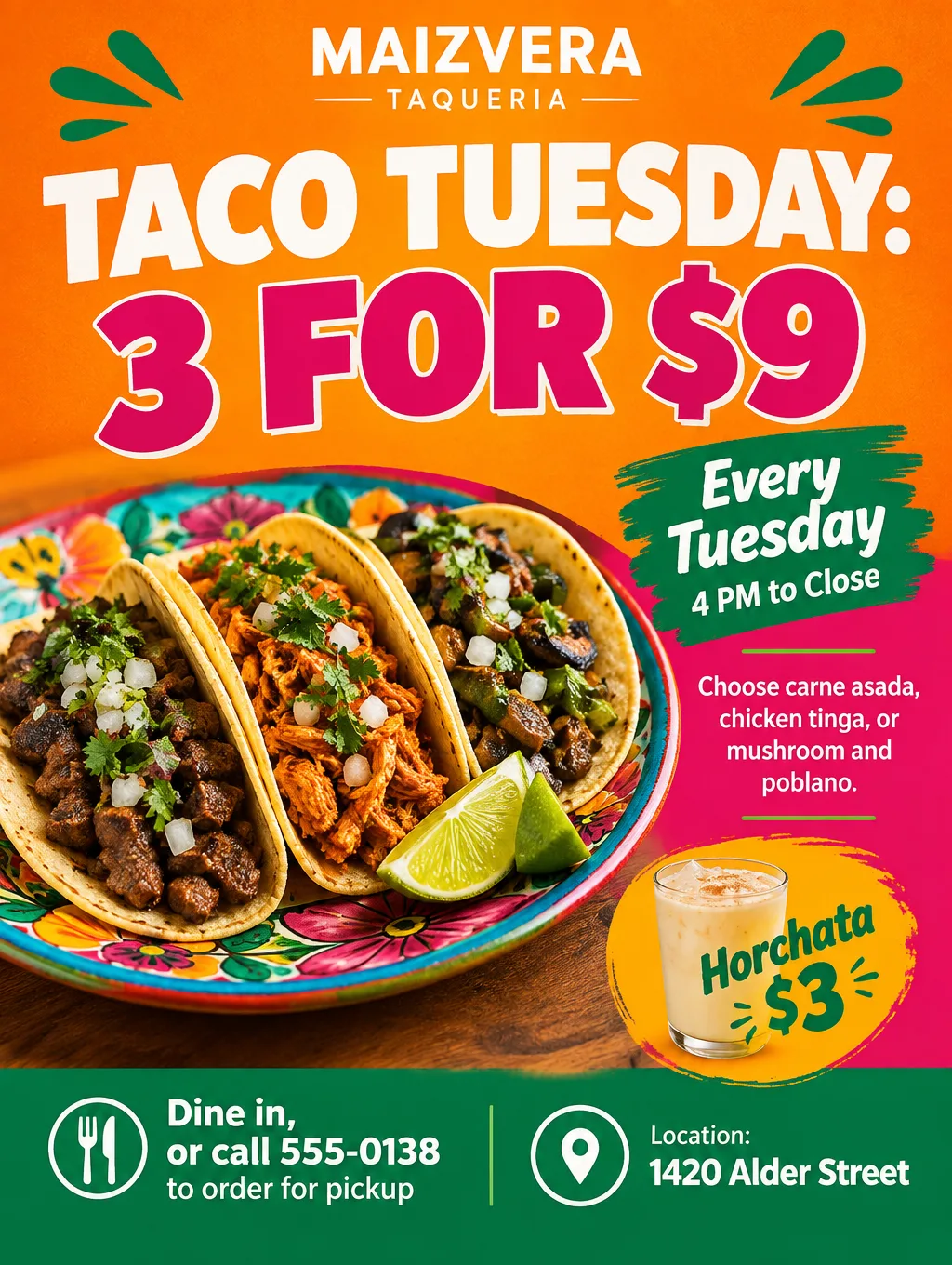
| Theme night | "Taco Tuesday: 3 for $9" | "Every Tuesday, 4 PM to close. Dine in or pickup." |
| Happy hour food menu | "Happy Hour Bites, $6" | "Monday to Friday, 3 to 6 PM, at the bar" |
| Lunch combo | "The Weekday Lunch Deal" | "Soup, half sandwich and a drink, $12, weekdays 11 AM to 2 PM" |
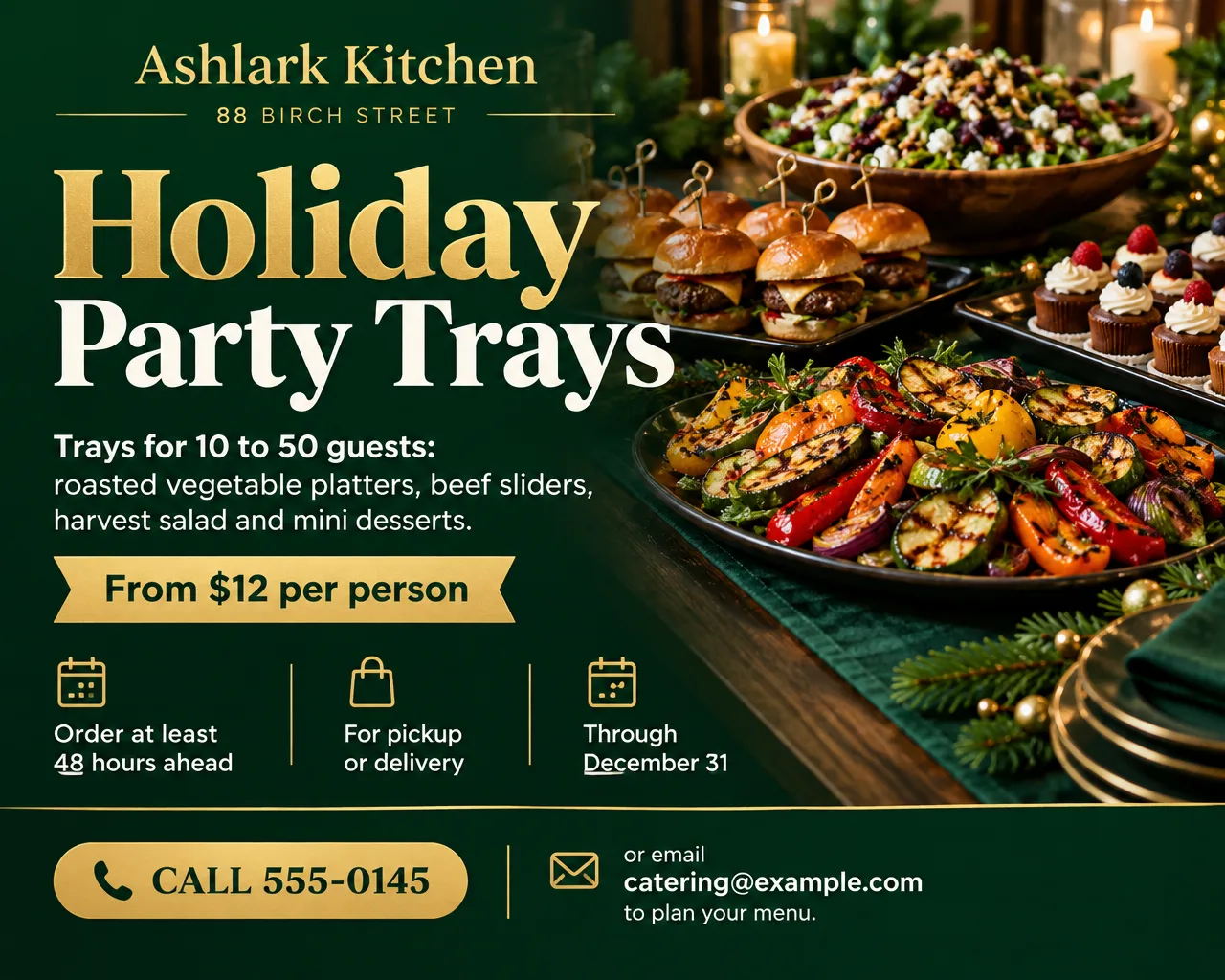
| Catering | "Holiday Party Trays" | "Serves 10 to 50. Order 48 hours ahead." |
| Delivery launch | "Now Delivering" | "Within 3 miles, 5 PM to 10 PM nightly" |
| Kids eat free | "Kids Eat Free Sundays" | "One kids' meal free with each adult entree, 4 to 8 PM" |
| Brunch launch | "Brunch Starts This Weekend" | "Saturdays and Sundays, 9 AM to 2 PM" |
| Holiday pre-orders | "Order Your Thanksgiving Pies" | "Pumpkin, apple or pecan, $24. Order by November 22." |
| Trivia or live music | "Trivia Night, Thursdays at 7" | "Teams up to 6. Prizes for the top three." |
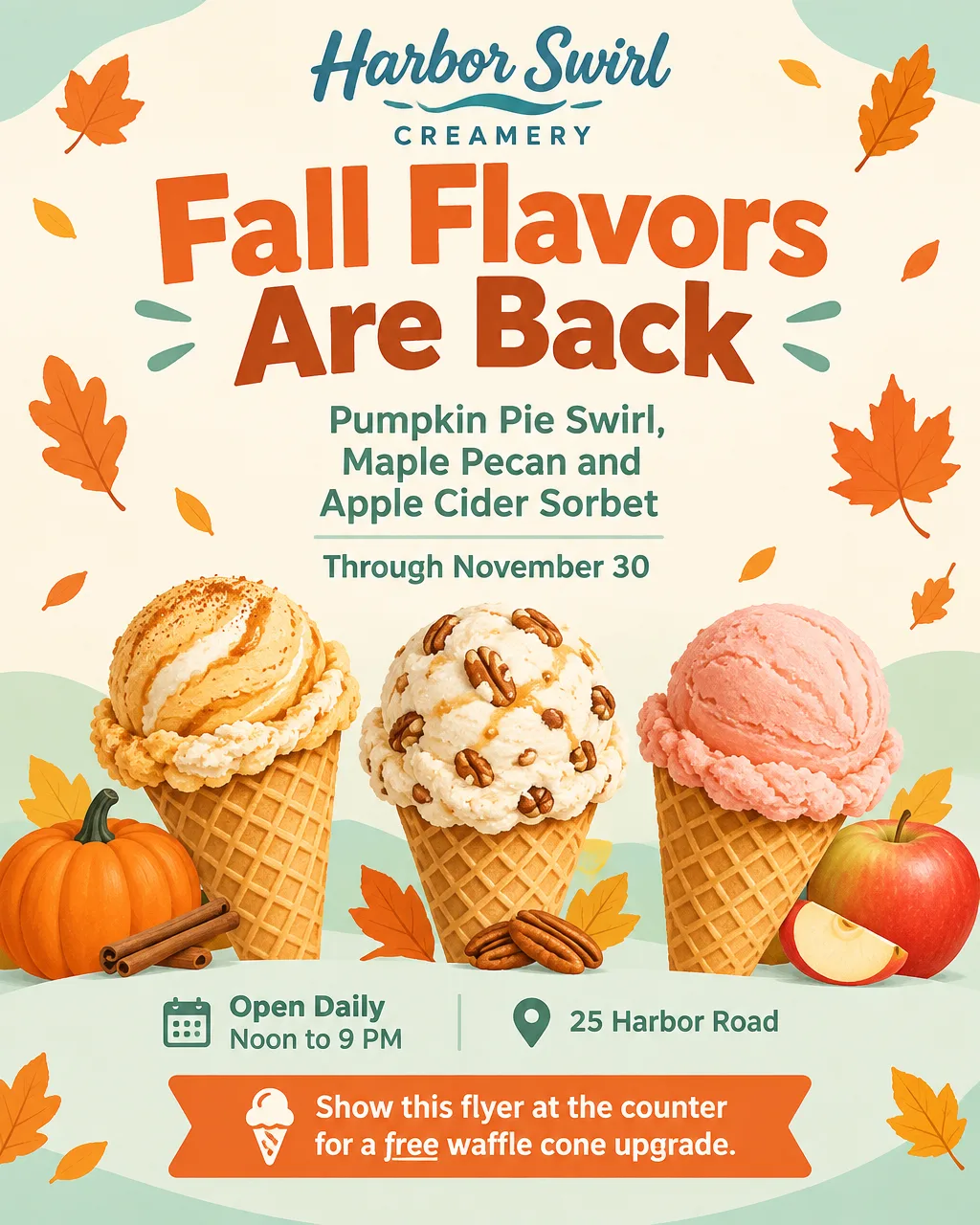
| Ice cream shop | "Fall Flavors Are Back" | "Pumpkin pie swirl and apple cider sorbet through November 30" |
| Grand opening | "Now Open on Alder Street" | "Free dessert with any entree during opening week" |
Wording that saves questions at the register:
- Say "dine in", "pickup" or "delivery". People want to know whether the deal works the way they order.
- Write the full price. "3 tacos for $9" tells people exactly what they pay; "tacos from $3" doesn't.
- Give the ending. "Through November 30" or "while the pies last" tells people when to come in.
- Add Spanish if your regulars read it. Spanish accents and ¿ ¡ print correctly in Flyer Maker. Still, have someone fluent go over each line before the flyer goes up. Layouts that carry both languages are in the bilingual Spanish flyer guide.
Some occasions need their own details. A trivia night flyer needs team size, start time and prizes, and an opening-week flyer needs the opening date and an opening-week offer. Office catering sells on tray sizes, per-person prices and lead time, which the catering flyer wording page goes into. A truck that moves around has to print its schedule, and flyers for food trucks show how. A flyer for an ice cream shop sells the flavor and the season more than the price, so the flavor names go in the headline.
Restaurant flyer design tips
A flyer for a restaurant gets read in a takeout bag, in the front window and at the register, and each spot changes the design.
Design the takeout bag flyer for the kitchen table. A half-sheet dropped into a delivery bag gets read after the meal. Put the next-order offer at the top and the pickup number in large type, so a customer can reorder without looking anything up.
Make the window flyer readable from the sidewalk. A letter-size flyer taped inside the front glass is read from several steps away. The headline and the price should be the two biggest things on it; tape it at eye level, facing out, away from glare.
Size counter flyers for the holder. Vistaprint's 2.5 x 4, 3.75 x 8.25 and 4 x 6 inch flyers fit clear flyer holders, the kind that sit beside a register. Of those, 4 x 6 comes closest to a Tall (3:4) design.
Show the dish you serve. Customers compare the flyer with the plate. If the photo shows a garnish you don't use, someone will ask for it, so photograph your own dish or pick an illustration.
Match the flyer to the menu and the register. Use the same dish names and prices as your menu and online ordering. When a price changes, replace the flyer the same day.
Keep one look across every flyer. The same logo, colors and type style on the window, bag and counter flyers helps regulars recognize a new promotion at a glance.
Restaurant flyer sizes and printing
Pick the size by where the flyer ends up. Flyer Maker makes three shapes, so each size below lists the closest fit.
| Where it goes | Print size | Pick in Flyer Maker |
|---|---|---|
| Taped in the front window or on a community board | Letter, 8.5 x 11 in | Tall (3:4), 4K |
| Takeout or delivery bag | Half letter, 5.5 x 8.5 in | Tall (3:4), 2K; fills 5.5 x 7.3 in of the sheet |
| Counter holder | 4 x 6 in | Tall (3:4) at 2K, with about 1/2 in cut from the sides |
| Social posts | 4:5 | Portrait (4:5), 1K or 2K |
For printing, choose 2K or 4K; the PNG has no bleed area. Standard paper sizes and their pixel counts are all in the standard flyer sizes chart.
Where restaurant flyers can and can't go
Not in or on mailboxes. Mailboxes are for stamped mail, so keep flyers out of them. Don't tape one to the box, hang it from the box or set it on top either. Hand flyers out in person, and put door hangers on the doorknob.
By mail, to a whole neighborhood. USPS's Every Door Direct Mail Retail service delivers to each address on the carrier routes you select, addressed simply to "Postal Customer". The piece has to count as a flat: 3.3 ounces at most, and longer than 10.5 inches, taller than 6.125 inches or thicker than 0.25 inch. A letter-size flyer passes on its 11-inch length. Retail mail also has a 0.007-inch minimum thickness, and your print shop can tell you which paper clears it. Every piece must carry the EDDM Retail indicia (the printed postage mark) above and right of the address block, so keep that part of the design free of text and art, and test the dimensions first with the EDDM Online Tool's Mailpiece Size Checker.
Drink deals: check your state first. Some states have rules about happy hour drink specials and how bars advertise them, so check with your state's alcohol board before you print a drink price. Where drink specials are off the table, a happy hour flyer can promote the food specials instead.
More restaurant flyer prompts
Two more restaurant flyer examples, written as prompts that run in Flyer Maker as they are. Swap the restaurant, prices and hours for yours.
Delivery launch flyer for Maizvera Taqueria, 1420 Alder Street. Headline: "Now Delivering". Tacos, burritos and bowls delivered within 3 miles, every night from 5 PM to 10 PM, $15 minimum order. Free delivery on your first order with code FIRSTBITE. Call 555-0141 to order. Bold red and cream design, a photo of a burrito bowl, and a small scooter icon.Happy hour food flyer for the bar at Ashlark Kitchen, 88 Birch Street. Headline: "Happy Hour Bites, $6". Monday to Friday, 3 PM to 6 PM, bar seating only. Truffle fries, beef sliders, crispy cauliflower and a cheese board, each $6. Walk in, no reservation needed. Warm amber lighting, dark wood colors and a photo of small plates on a bar counter.Common restaurant flyer mistakes
- A price that doesn't match the register. The customer holding the flyer expects that price. Check every number against your POS before printing.
- A coupon with no end date. Without one, the flyer is still valid in a customer's drawer a year from now.
- The name as the headline. "Ashlark Kitchen" tells a passerby nothing new; "Holiday Party Trays" gives them a reason to call.
Make a restaurant flyer in Flyer Maker
- Write the promotion into the "Describe your flyer" box of Flyer Maker. Put the offer first, in quotes as the headline, and after it the price and terms, days and hours, the address, how to order, and the dish you want pictured.
- Add your logo, the same one that's on your menu and sign.
- Pick the size. Tall (3:4) for the window and print, Portrait (4:5) for Instagram and Facebook, Wide (5:4) for email.
- Under "More options", pick Restaurant as the Flyer type. Choose Photos under Pictures for a dish-led flyer, and set Quality to 2K or 4K for printing. For Colors, "My brand colors" works once your description names them ("terracotta and cream").
- Put your phone number and ordering website in "Contact info". Flyer Maker uses only the contact details you type.
- Turn on "Leave a blank square for your QR code" when the flyer points to online ordering, and after downloading, set your real code in that spot. Flyer Maker doesn't draw codes.
- Select "Create flyer". The finished design takes about 30 seconds.
- Check every price, date, time, address and phone number. For a wrong price, type the fix as a plain request in the "Want to change something?" box (currently 60 credits, 70 for 2K, 90 for 4K); several changes at once are easier as a corrected description and a new flyer.