A photography flyer is unusual because the picture on it is the product. Photographers post them for fall and holiday mini sessions, weddings and office headshot days, in coffee shop windows, on studio doors, at bridal shows and in local parent groups. This page also covers three businesses that sell trust from one sheet of paper: therapists, travel agencies and dental clinics. You'll find checklists, wording, what each of those flyers should leave off, sizes, and the settings to use in Flyer Maker. Other local businesses are covered in the small business flyer guide.
What to put on a photography flyer
One offer per flyer. These details go on it, listed roughly by how large each should print:
Must have
- The session type, with a name. "Fall Mini Sessions" or "Team Headshot Day".
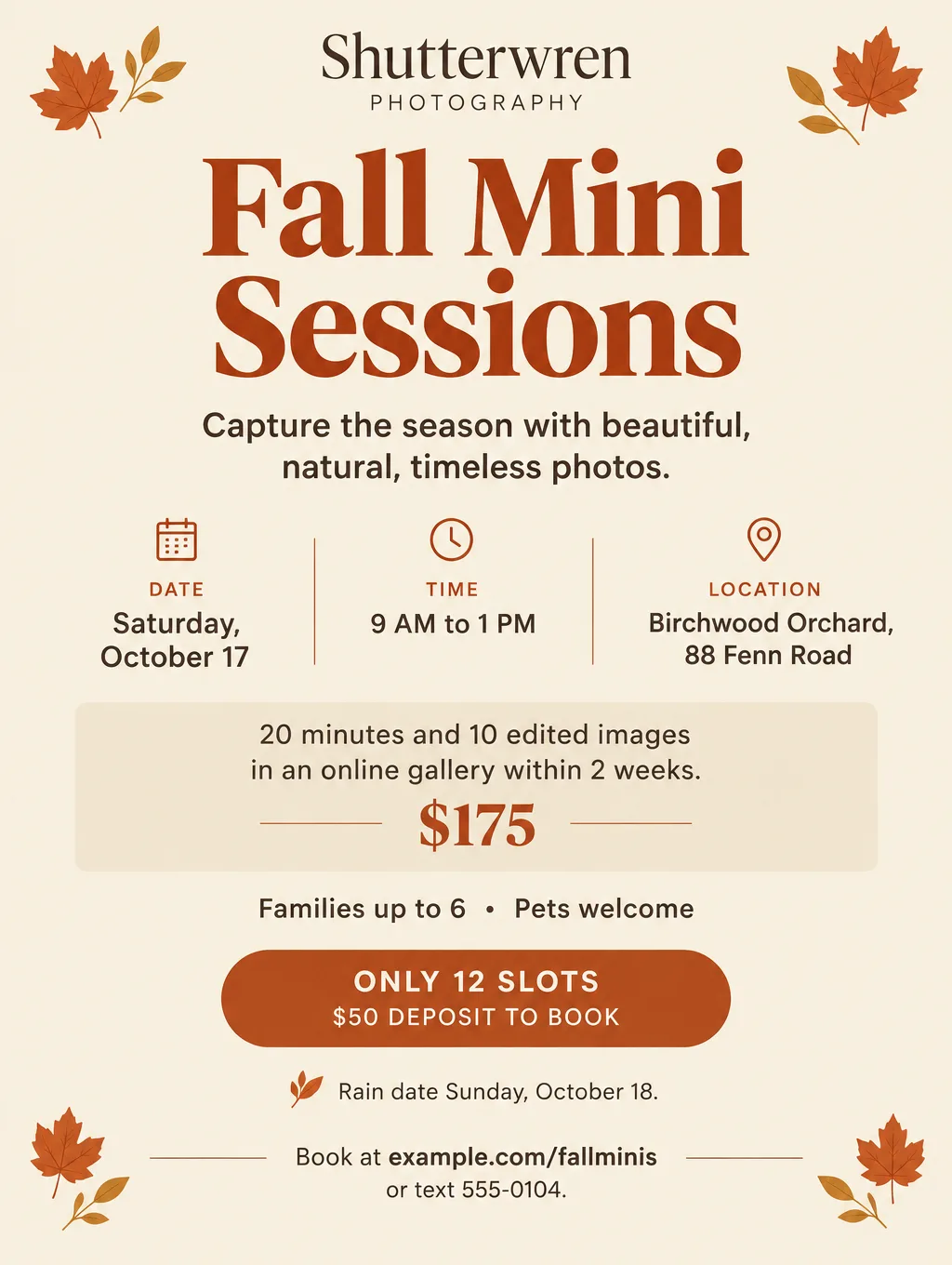
- Date, time window and location. "Saturday, October 17, 9 AM to 1 PM, at Birchwood Orchard, 88 Fenn Road."
- Session length and what clients receive. "20 minutes, 10 edited images in an online gallery within 2 weeks."
- Price and deposit. "$175, with a $50 deposit to hold your slot."
- Who it's for. "Families up to 6, pets welcome."
- How to book. A booking link as a QR code, or a number that takes texts.
- One photo you took, from a real session, with the client's written permission.
- Your business name and logo.
Optional
- How many slots. "12 slots", only if that's the real number.
- A rain date. "If it rains: Sunday, October 18."
- An outfit note. "Color guide sent after you book."
- Add-on prices. "Extra images $15 each."
- Your gallery link or Instagram handle.
Photography flyer ideas and wording
These photography flyer ideas cover the sessions a small studio runs through the year. Names, prices and dates are made up.
Fall mini sessions
- Headlines: "Fall Mini Sessions at Birchwood Orchard" or "20 Minutes, 10 Photos, One Saturday"
- Supporting line: "Saturday, October 17, 9 AM to 1 PM. $175 for 20 minutes and 10 edited images."
- Call to action: "Book one of 12 slots at example.com/fallminis."
Holiday minis
- Headlines: "Holiday Minis in the Studio" or "Card Photos Before December"
- Supporting line: "Sunday, November 15, on a studio set with a tree and lights. 15 minutes, 8 images, $150. Galleries delivered by December 1 for card orders."
- Call to action: "Text 555-0104 to reserve a time."
Headshot days for offices
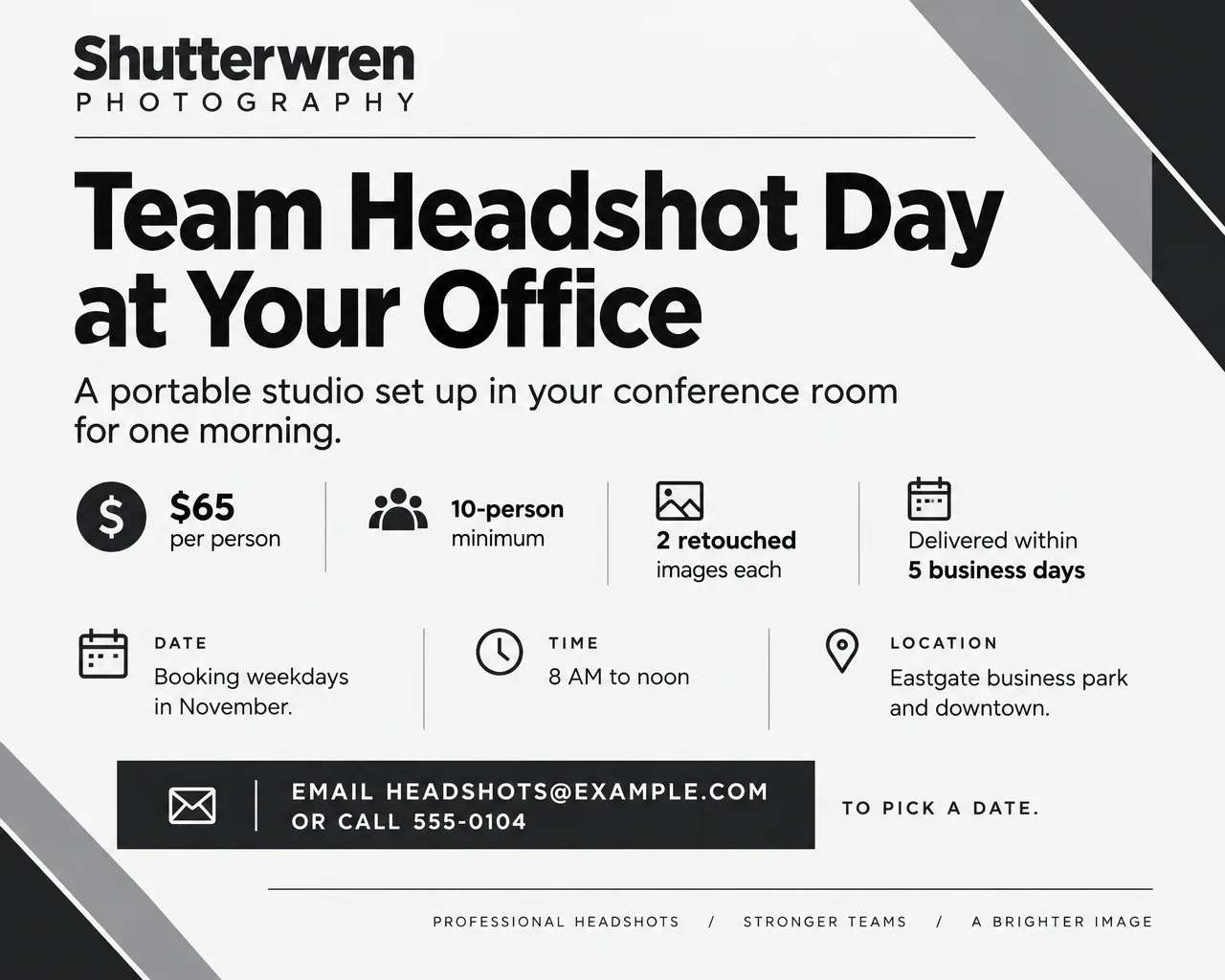
A flyer for photography business clients, such as office managers and real estate teams, sells a group rate and a single visit.
- Headlines: "Team Headshot Day at Your Office" or "Headshots for the Whole Team, One Morning"
- Supporting line: "Portable studio in your conference room. $65 per person, 10-person minimum, 2 retouched images each."
- Call to action: "Email headshots@example.com to pick a date."
Wedding and engagement photography
A wedding photography flyer usually sits on a bridal show table or a venue's vendor board, next to other photographers' flyers. Print the hours of coverage and a starting price, so a couple can compare you with the flyer beside yours without calling.
- Headlines: "Engagement Sessions This Fall" or "Wedding Photography, Now Booking Next Season"
- Supporting line: "Full-day coverage from $2,400, with a second photographer and an online gallery. Engagement session included."
- Call to action: "Scan to see three full wedding galleries and check your date."
Beginner photography class
A studio can also teach. Registration, seat counts and deadlines work the same way as on the workshop flyer ideas.
- Headlines: "Learn Your Camera in One Afternoon" or "Get Off Auto Mode"
- Supporting line: "Saturday, November 7, 1 to 4 PM. Manual mode, light and composition. $85, 10 seats."
- Call to action: "Register at example.com/cameraclass."
Use your photos, not AI pictures, on a photography flyer
Show only your own work on a photography flyer. A client books because of what the sample photo promises, and an AI-made "sample" is a picture of work you never did. Flyer Maker has a single upload, "Add your logo", meant for a logo, and its Photos choice generates a fresh image instead of placing yours. That leaves three honest routes:
- A type-led flyer. In Flyer Maker, set Pictures to Minimal or Illustration and let a large headline, the date and a QR code linking your gallery do the work.
- A photo-led flyer. On a Pro plan, upload your strongest image from a real session to Smart Editor, then type the flyer text into "What should change?": "Add the headline Fall Mini Sessions across the sky at the top and the date and price along the bottom. Keep the people exactly the same." Every Smart Editor edit redraws the full image, so compare faces and small details with your original.
- A better source photo first. Straightening, light and background fixes are covered in how to make a photo look professional.
Therapist, travel agency and dental clinic flyers
These three businesses sell something a reader can't see on the flyer, so every line should be plain and easy to check.
Flyer for therapist
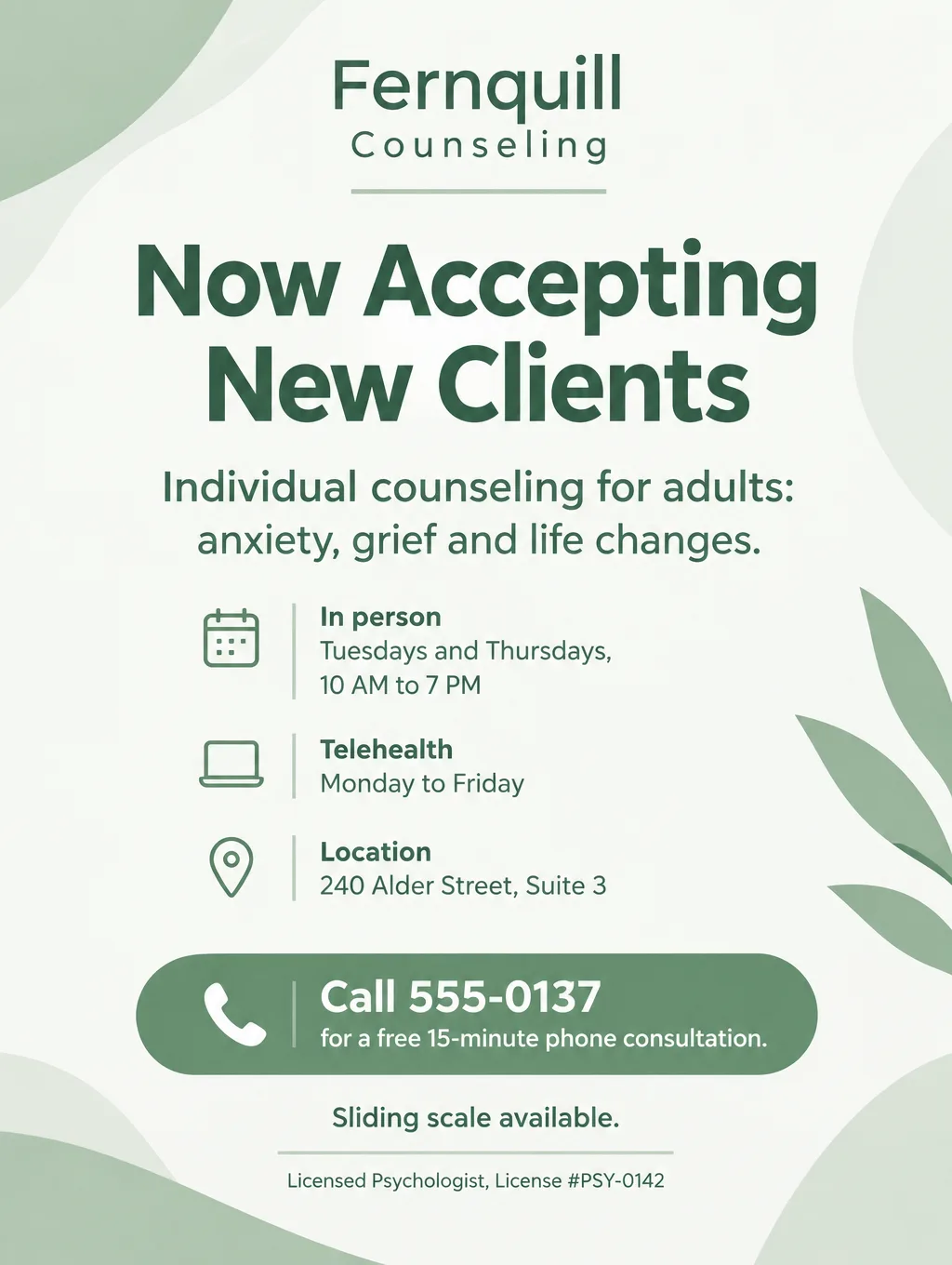
A flyer for therapist practices says who you help and how to start, and promises nothing about results. Leave off claims about how well or how fast therapy works, and don't ask current clients for testimonials. Your profession and state board may have their own advertising rules, so check them before you print. Whatever your license, print its type and number, and your fee or sliding scale if you offer one.
- Headlines: "Now Accepting New Clients" or "Evening and Telehealth Appointments"
- Supporting line: "Individual counseling for adults: anxiety, grief and life changes. In person Tuesdays and Thursdays, telehealth weekdays."
- Call to action: "Call 555-0137 for a free 15-minute phone consultation."
- Leave off: "Feel better in 6 sessions", client quotes and success stories.
Flyer for travel agency
A flyer for travel agency events and trips should carry your seller of travel registration number if you have one. Some states ask sellers of travel to register and show that number on their ads, so check yours before you print.
- Headlines: "Group Trip Info Night" or "Plan Your Honeymoon With a Local Advisor"
- Supporting line: "Thursday, October 22, 6:30 PM, at Kettlewing Travel, 301 Garnet Street. Trip ideas and coffee, no cost to attend."
- Call to action: "RSVP to trips@example.com." Print the registration number in the footer, where a traveler checking you out will look for it.
Flyer for dental clinic
A flyer for dental clinic openings can list services, as long as every line is one you can stand behind. Skip claims that raise expectations about results. If you're a general dentist, say so beside the services, so nothing suggests a specialist. Some state dental boards have their own advertising rules, so check yours before you print.
- Headlines: "New Patients Welcome" or "Saturday Cleanings, Now Booking"
- Supporting line: "Cleanings, fillings, crowns and clear aligners from our general dentists."
- Call to action: "Call 555-0190 to book a first visit."
- Leave off: "Painless", "perfect smile guaranteed" and "best dentist in town".
Photography flyer design tips
Type goes on the quiet part of the photo. On a photo-led flyer, put the headline over sky, a plain wall or an out-of-focus background, never across a face.
Match the palette to the session. Rust and cream for fall minis, deep green and gold for holiday minis, black and white for office headshots.
Put the price and slot count together. "$175, 12 slots" answers the two numbers people check before they book.
Let type carry a flyer with no photo. Elegant or Minimal style with Minimal pictures and a Centered layout gives a big headline and a QR code room to breathe.
Keep clinics and therapists calm and plain. Light colors, a Friendly or Serious tone, and one simple shape or none. Skip stock images of smiling patients.
Photography flyer sizes and printing
A studio needs a window flyer, a card to hand out at sessions and two screen versions:
| Piece | Size | Pixels at 300 DPI | In Flyer Maker |
|---|---|---|---|
| Coffee shop or studio window | 8.5 x 11 in | 2550 x 3300 | Tall (3:4), 4K |
| Card handed out at sessions | 5 x 7 in | 1500 x 2100 | Tall (3:4), 2K, trimmed |
| Instagram post | Phone screen | Not printed | Portrait (4:5), 1K |
| Email to past clients | Email width | Not printed | Wide (5:4), 1K or 2K |
Cut about 1/4 inch off the width of a 2K Tall print (1536 x 2048 pixels) and it makes a 5 x 7 card at close to 290 pixels per inch. Flyer Maker files are PNG images without bleed, so ask your print lab how it handles color to the edge. For printing, choose 2K or 4K, and see the flyer size guide for poster and postcard sizes.
More prompts for photographers, agencies and clinics
Three more flyers to paste in: a holiday session, a travel event and a dental opening. Replace the invented names, prices and numbers.
Flyer for Shutterwren Photography, 16 Mercer Lane. Headline: "Holiday Minis in the Studio". Sunday, November 15, 10 AM to 4 PM, on a studio set with a tree and warm lights. 15 minutes and 8 edited images, $150. Galleries delivered by December 1 for card orders. Families up to 5. Text 555-0104 or book at example.com/holidayminis. Pine green and warm gold palette with a few small illustrated ornaments and no photos.Event flyer for Kettlewing Travel, 301 Garnet Street. Headline: "Group Trip Info Night". Thursday, October 22, 6:30 to 8 PM. Hear about next summer's group trips, ask questions and meet the advisors. Coffee and dessert, no cost to attend, adults welcome. RSVP to trips@example.com or call 555-0145. Print "Seller of Travel Reg. No. 0142" small in the footer. Warm sunset orange and deep blue design with an illustration of a suitcase and a paper airplane.Flyer for Tallowbrook Family Dental, 902 Sorrel Avenue. Headline: "New Patients Welcome". Cleanings, fillings, crowns and clear aligners from our general dentists. Open Monday to Thursday, 8 AM to 6 PM, and Saturdays 9 AM to 1 PM. Call 555-0190 to book a first visit. Clean white and soft blue, one simple toothbrush illustration, no slogans.How to make a photography flyer in Flyer Maker
There is no photography flyer template to fill in: the page is designed from what you write in the description.
- In Flyer Maker, write the full flyer text in "Describe your flyer". The quoted headline comes first, then the date, time window, address, session length, images delivered, price, slot count and booking link.
- Upload a logo through the "Add your logo" button. It's the only image upload, and Flyer Maker tends to set it at a modest size in the header or footer.
- Pick a "Size". Tall for windows and cards, Portrait for Instagram, Wide for emails to past clients.
- Open "More options". Event suits minis and Business suits headshot offers as the Flyer type. Choose Elegant or Minimal for the Style, Minimal or Illustration for the Pictures, and Centered for the Layout. To use your studio colors, choose "My brand colors" and spell them out in the description ("rust and cream").
- Switch on "Leave a blank square for your QR code" for a booking link, then paste your real code in after you download. Flyer Maker won't draw one.
- "Create flyer" takes about 30 seconds and currently uses 80 credits at 1K, 90 at 2K or 100 at 4K. Pick 2K for 5 x 7 cards.
- Proofread the date, weekday, address, price and slot count, and delete any tagline you didn't write, which matters most on a therapist or clinic flyer. Correct a line by typing it into "Want to change something?" (currently 60 credits at 1K, 70 at 2K, 90 at 4K), or rework the description and generate again.