Flyer ideas for a school project usually serve one of three jobs: a class assignment that asks you to promote a cause or event, a student council campaign, or a club, event or yearbook sale that needs posters in the hallway. This page has wording for each, science fair poster ideas, and the rules for using AI images at school. If the assignment is to design the flyer yourself, ask your teacher before you use any AI tool.
What to put on a school project flyer
Most school flyers are read by someone walking between classes. Write down these details first, in this order.
- One message. "Vote Tessa for Treasurer" or "Robotics Club Starts Tuesday". If it takes more than eight words, the flyer is trying to do two jobs.
- The name of the event, club or candidate, spelled the way they want it.
- Day, date and time. "Tuesday, October 6, 3:15 PM."
- Room or place. Inside a school, "Room 214" or "the library" is the address.
- Who can come, join or vote. "All grades", "8th graders only", "Open to every student".
- One call to action. "Vote in homeroom Thursday", "Sign up in Room 214", "Order by November 13".
- Club or class and the advisor. "Robotics Club, advisor Mr. Alvarez."
- Space for approval. If your school stamps or initials posters before they go up, leave a clear corner for it.
- Image credit, when a teacher or fair asks for one: the tool and the date.
- Your name and class period on a graded assignment, at the bottom or on the back.
Optional:
- Price and deadline for a sale: "$45 through November 13."
- A QR code linking to an online sign-up, if your school allows online forms.
Flyer ideas for school projects, clubs and campaigns
Every name, room and date below is invented; use your own.
Student council campaign flyers
Flyer ideas for student council work when the name, the position and the vote day can be read in two steps down the hall. Keep slogans about school life and check your school's campaign rules for poster size, how many you can hang and where.
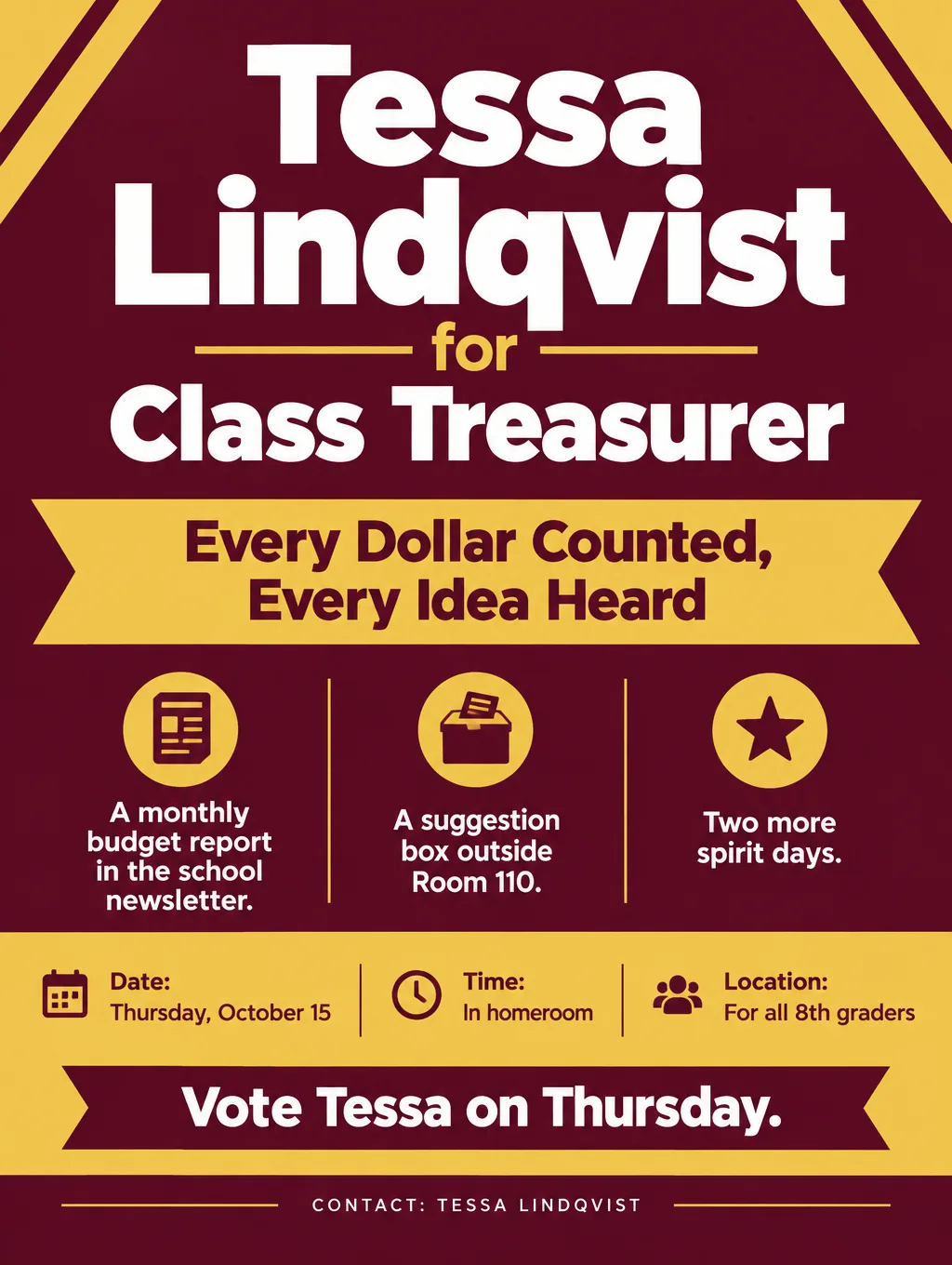
- Slogans: "Tessa for Treasurer: Every Dollar Counted", "Vote Jamal for Secretary: Notes You Can Actually Read", "Leo for Class Rep: Your Ideas, Out Loud"
- Promises student council can keep: "Two more spirit days", "A suggestion box outside Room 110", "Monthly budget updates in the newsletter"
- Call to action: "Vote Thursday, October 15, in homeroom."
Skip "no homework" and "longer lunch" unless the council really controls them.
Club recruitment flyers
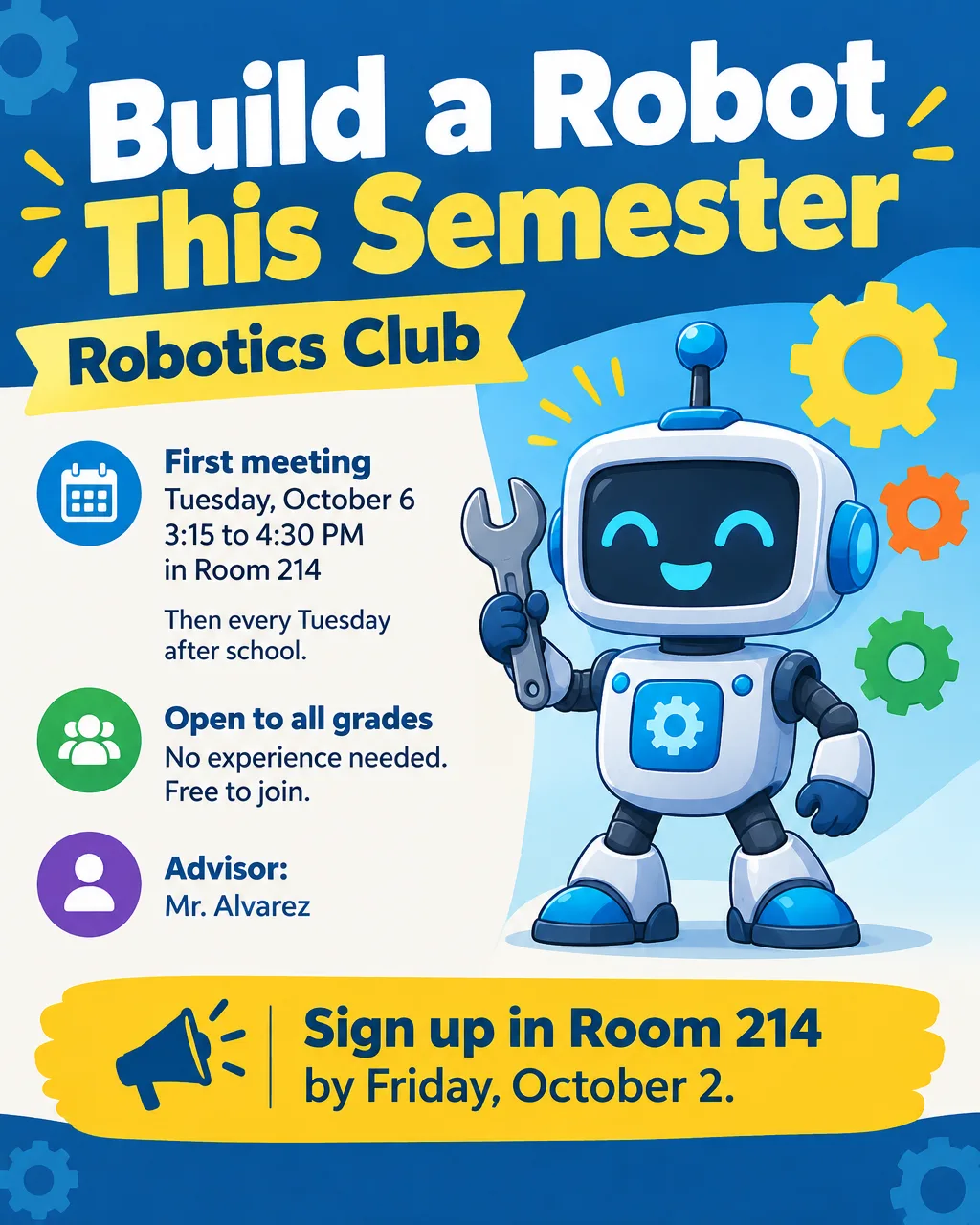
- Headlines: "Build a Robot This Semester", "Chess Club: All Levels, Every Wednesday" or "Green Team: Help Run the Recycling Program"
- Supporting line: "First meeting Tuesday, October 6, 3:15 PM, Room 214. No experience needed."
- Call to action: "Sign up in Room 214 or ask Mr. Alvarez."
For club fairs and open houses at the start of the year, the start-of-year event flyers have wording to borrow, and a club raising money can use the wording for a club bake sale.
Yearbook sales and picture day
A flyer for yearbook sales needs the price, the date the price goes up, and where to order.
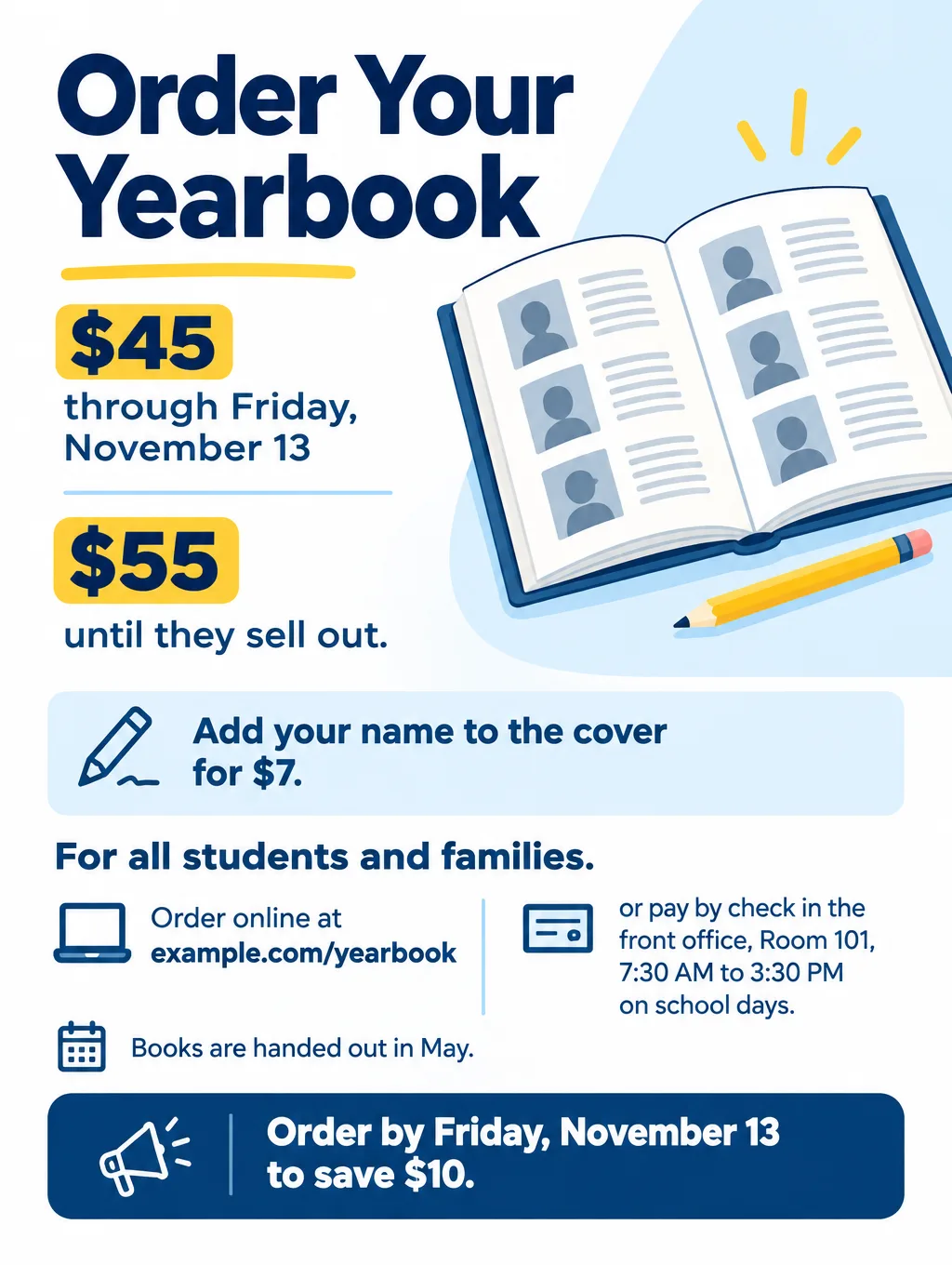
- Headlines: "Order Your Yearbook", "Yearbooks Are $45 Until Friday" or "Picture Day Is Wednesday, October 14"
- Supporting line: "$45 through November 13, then $55. Add your name to the cover for $7."
- Call to action: "Order at example.com/yearbook or in the front office."
Class assignment flyers
When a teacher asks you to design a flyer that promotes a cause, build it straight from the rubric, one line of the flyer per line of the rubric. Awareness flyers can lead with the action you want: "Recycle Right: Cans and Bottles in the Blue Bin", "Fill Room 118: Canned Food Drive Through Friday", "Turn Off the Lights When You Leave".
Science fair poster ideas and layout
A science fair poster tells your project in the order you did it: the question, your hypothesis, the materials and procedure, your data, the results and the conclusion. A board reads left to right, so start that story on the left panel and end it on the right, with the title and your main graph on the center panel.
Science fair poster ideas that help a judge:
- Turn the question into the title. "Does Salt Water Freeze Slower Than Tap Water?" tells a judge the project in one line.
- Graph your real data. Never let an AI tool make up measurements, graphs or results. Draw charts from your own numbers.
- Credit every graphic, including your own. The Regeneron ISEF rules ask for a credit on every image, even photos you took, and even when a picture's license doesn't require one.
- Cite AI images as AI-made. ISEF allows AI-created graphics, but the credit has to say they were AI-made and give the AI tool and the date. For an image you changed with AI, credit the original too.
- Get releases for photos of people. ISEF requires a signed photo release for anyone pictured other than the student, kept in your notebook, not on the board.
- Leave contact details and QR codes off. ISEF doesn't allow web addresses, email, phone numbers or QR codes on the display. The only personal details it permits are your name, school, city, state, country, age and grade.
- Save a letter-size gap for the abstract. ISEF's Display and Safety Committee recommends not printing your abstract on the board. Leaving an 8.5 x 11 inch blank space for the official one is fine.
At ISEF, a project has to fit within 76 cm deep, 122 cm wide and 240 cm tall (about 30 x 48 x 94 inches), including the stand and any table cover. Your school or regional fair may set smaller limits, so read its rules first.
Using an AI poster maker for a school project
An AI poster maker for a school project is fine when your teacher allows it and you credit it. It's a problem when the grade is for your own design work. Before you start:
- Ask first. A teacher may want the layout, drawing or lettering to be yours.
- Credit it the way your class or fair asks. A short line that says the image is AI-made and names the tool and the date, such as "AI-generated image, Toybox AI Flyer Maker, October 3", covers what ISEF asks for.
- Leave classmates out of it. Don't upload or describe real students without their permission. Toybox AI's Terms prohibit generating images of real people without their explicit consent.
- Check the age rule. Toybox's Terms require users to be 13 or older, and users under 18 need a parent's or guardian's permission.
Students who want an AI poster maker for something outside school, such as a club's community event or a small business, can use the AI poster maker guide for event and class posters, which covers which poster sizes stay sharp. Teachers planning a whole unit can start from the guide to classroom AI tools.
Design tips for school hallway flyers
Write the headline for walking speed. Six words or fewer, in the largest type, so it can be read in the time it takes to pass a locker bank.
Check your school colors for contrast. Gold or yellow text on a white background fades from across a hallway. Put light colors on a dark background instead.
One flyer, one message. A campaign poster that also lists club meetings gets neither read. Make two flyers.
Keep text away from the edges. Hallway flyers get taped at the corners and often overlap the next poster, so keep every word at least an inch in from the edge.
Match the style to the job. Bold styles and strong colors suit campaign posters. Playful styles and illustrations suit club fairs. A minimal style suits a science fair title banner, where the data should get the attention.
School flyer and poster sizes
Pick the size by the wall it goes on.
| School wall | Paper | Flyer Maker setting | Pixels per inch at that size |
|---|---|---|---|
| Classroom door or bulletin board | Letter, 8.5 x 11 in | Tall, 4K | About 300 |
| Main hallway or cafeteria wall | Tabloid, 11 x 17 in | Tall, 4K | About 225 |
| Campaign poster | 16 x 20 in | Portrait, 4K | 160 |
| Class group chat or club account | 4:5 image | Portrait, 1K | Screen only |
Vistaprint offers 11 x 17, 16 x 20 and 18 x 24 inch posters. Its poster FAQ sets 150 dpi at the final print size as the minimum and recommends 300. Portrait at 4K is 2560 x 3200 pixels, the exact 4:5 shape of a 16 x 20 poster, so it prints there at 160 pixels per inch. An 18 x 24 poster matches Tall's 3:4 shape, but the 4K Tall file (2480 x 3312 pixels) comes to about 138 per inch at that size, under Vistaprint's minimum. On 11 x 17 paper, a 3:4 design leaves about 1.2 inches of blank paper above and below. The paper and poster size chart has other sizes.
More school flyer prompts
Science fair event flyer. Headline: "Science Fair Night". Thursday, March 11, 6 to 8 PM, in the school gym, 300 Ridge Road. 60 student projects from grades 6 to 8, with judging results at 7:30 PM. Free, and families are welcome. Call to action: "Students, register your project with Ms. Chen in Room 118 by Friday, February 19." Clean illustration of a beaker, a magnifying glass and a small plant.Awareness flyer for a class project. Headline: "Recycle Right". Starting Monday, October 5, cans, plastic bottles and clean paper go in the blue bin in every classroom. Food, wrappers and cups go in the trash. The Green Team empties the blue bins every Friday. Questions? Find the Green Team in Room 122 at lunch. Call to action: "Check the bin before you toss." Bold green and white illustration of a blue recycling bin with a can and a bottle.How to make a school project flyer in Flyer Maker
- Check the rules. Confirm your teacher or advisor allows AI, and get a parent's OK if you're under 18.
- Type the message into "Describe your flyer". Open Flyer Maker and give the headline, name, day, date, time, room, who it's for and the call to action. Name your school colors in words, like "maroon and gold".
- Choose the Size. Tall for letter and 11 x 17 prints, Portrait with 4K Quality for a 16 x 20 campaign poster, or Portrait at 1K for a group chat.
- Set the Flyer type under "More options". Announcement fits campaigns and notices, Education fits clubs and classes, and Sale fits yearbooks. Set Colors to "My brand colors" when you've named school colors in the description.
- Tap "Create flyer" and give it about half a minute.
- Proofread names and numbers. A misspelled candidate name or the wrong room number sinks a school flyer. If something is off, ask for the correction in the "Want to change something?" box (currently 60 credits, 70 at 2K, 90 at 4K), or reword the description and make another.
- Add your credit line under the flyer or on your board, with the date you made it.